# News search and recommendation tutorial - Searchers
This is the sixth part of the tutorial series for setting up a Vespa application for personalized news recommendations. The parts are:
1. [Getting started](news-1-deploy-an-application.html)
2. [A basic news search application](news-2-basic-feeding-and-query.html) - application packages, feeding, query
3. [News search](news-3-searching.html) - sorting, grouping, and ranking
4. [Generating embeddings for users and news articles](news-4-embeddings.html)
5. [News recommendation](news-5-recommendation.html) - partial updates (news embeddings), ANNs, filtering
6. [News recommendation with searchers](news-6-recommendation-with-searchers.html) - custom searchers, doc processors
7. [News recommendation with parent-child](news-7-recommendation-with-parent-child.html) - parent-child, tensor ranking
8. Advanced news recommendation - intermission - training a ranking model
9. Advanced news recommendation - ML models
In the previous part of this series, we set up a recommendation system that, given a user id, needed two requests to generate a recommendation. The first to retrieve the user embedding, and a second for finding the nearest neighbor news articles. In this part, we'll introduce `Searchers`, which are processors that can modify queries before passing them along to search. These allow us to pull the logic from the Python scripts into Vespa.
For reference, the final state of this tutorial can be found in the[app-6-recommendation-with-searchers](https://github.com/vespa-engine/sample-apps/tree/master/news/app-6-recommendation-with-searchers) directory of the `news` sample application.
## Searchers and document processors
First, let's revisit Vespa's overall architecture:
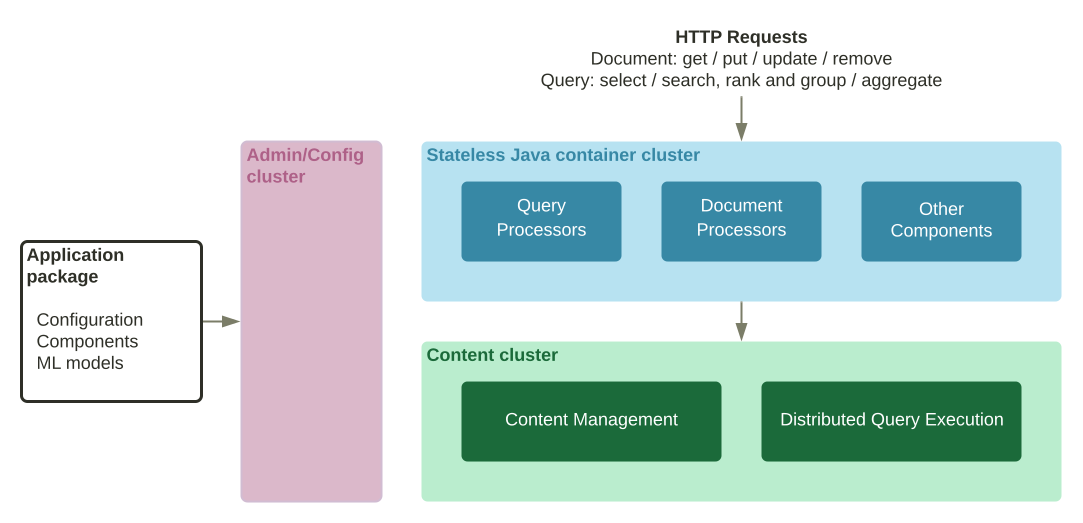
Recall that the application package contains everything necessary to run the application. When this is deployed, the config cluster takes care of distributing the services to the various nodes. In particular, the two main types of nodes are the stateless `container` nodes and the stateful `content` nodes.
All requests pass through the `container` cluster before passing along to`content` cluster where the actual retrieval and ranking occurs. The queries actually pass through a chain of Searchers; each one possibly doing a small amount of processing. This can be seen by adding a `&trace.level=5` to a query:
```
{ "message": "Invoke searcher 'com.yahoo.search.querytransform.WeakAndReplacementSearcher in vespa'" },
{ "message": "Invoke searcher 'com.yahoo.prelude.statistics.StatisticsSearcher in native'" },
{ "message": "Invoke searcher 'com.yahoo.prelude.querytransform.PhrasingSearcher in vespa'" },
{ "message": "Invoke searcher 'com.yahoo.prelude.searcher.FieldCollapsingSearcher in vespa'" },
{ "message": "Invoke searcher 'com.yahoo.search.yql.MinimalQueryInserter in vespa'" },
{ "message": "Federating to [mind]" },
{ "message": "Got 10 hits from source:mind" },
{ "message": "Return searcher 'federation in native'" },
{ "message": "Return searcher 'com.yahoo.search.yql.MinimalQueryInserter in vespa'" },
{ "message": "Return searcher 'com.yahoo.prelude.searcher.FieldCollapsingSearcher in vespa'" },
{ "message": "Return searcher 'com.yahoo.prelude.querytransform.PhrasingSearcher in vespa'" },
{ "message": "Return searcher 'com.yahoo.prelude.statistics.StatisticsSearcher in native'" },
{ "message": "Return searcher 'com.yahoo.search.querytransform.WeakAndReplacementSearcher in vespa'" },
```
This shows a small sample of the additional output when using `trace.level`. Note the invocations of the Searchers. Each Searcher gets invoked along a chain, and the last Searcher in the chain sends the post-processed query to the search backend. When the results come back, the processing passes back up the chain. The Searchers can then process the results before passing them to the previous Searcher, and ultimately back as a response to the query.
**Note:** Adding a [trace.level](../../reference/query-api-reference.html#trace.level)is generally helpful when debugging vespa queries.
So, [Searchers](../../searcher-development.html) are Java components that do some kind of processing along the query chain; either modifying the query before the actual search, modifying the results after the search, or some combination of both.
Developers can provide their own Searchers and inject them into the query chain. We'll capitalize on this and create a Searcher that performs essentially the same task that[user\_search.py](https://github.com/vespa-engine/sample-apps/blob/master/news/src/python/user_search.py) does: retrieve a user embedding and do a news article search based on that. In the process, we'll only pass a `user_id` to Vespa instead of a full YQL query:`/search/?user_id=U33527&searchchain=user`
The search will take care of creating the actual query for us - let's get started.
## Adding a user profile Searcher
While the `content` layer in Vespa is written in C++ for maximum performance, the `container` layer is in Java for flexibility. So, all Searchers and thus custom Searchers are written in Java. Refer to [the guide on Searcher development](../../searcher-development.html) for more information.
We want to create a Searcher that takes a `user_id`, issues a query to find the corresponding embedding, then issues a second query to retrieve the news articles.
To do this, we create a `UserProfileSearcher` that extends the base Searcher class `com.yahoo.search.Searcher`. This Searcher must implement a single method: `search`, and has the responsibility of passing the query to the next Searcher on the list. A minimal example:
```
public class UserProfileSearcher extends Searcher {
public Result search(Query query, Execution execution) {
// ... process query
Result results = execution.search(query)
// ... process results
return results;
}
}
```
So, what we do before we pass the query along (in `execution.search(query)`) and before we return the results is completely up to us. So, we implement our `UserProfileSearcher` like this:
```
public class UserProfileSearcher extends Searcher {
public Result search(Query query, Execution execution) {
// Get tensor and read items from user profile
Object userIdProperty = query.properties().get("user_id");
if (userIdProperty != null) {
// Retrieve user embedding by doing a search for the user_id and extract the tensor
Tensor userEmbedding = retrieveUserEmbedding(userIdProperty.toString(), execution);
// Create a new search using the user's embedding tensor
NearestNeighborItem nn = new NearestNeighborItem("embedding", "user_embedding");
nn.setTargetNumHits(query.getHits());
nn.setAllowApproximate(true);
query.getModel().getQueryTree().setRoot(nn);
query.getRanking().getFeatures().put("query(user_embedding)", userEmbedding);
query.getModel().setRestrict("news");
// Override default rank profile
if (query.getRanking().getProfile().equals("default")) {
query.getRanking().setProfile("recommendation");
}
}
return execution.search(query);
}
private Tensor retrieveUserEmbedding(String userId, Execution execution) {
Query query = new Query();
query.getModel().setRestrict("user");
query.getModel().getQueryTree().setRoot(new WordItem(userId, "user_id"));
query.setHits(1);
Result result = execution.search(query);
execution.fill(result); // This is needed to get the actual summary data
if (result.getTotalHitCount() == 0)
throw new RuntimeException("User id " + userId + " not found...");
return (Tensor) result.hits().get(0).getField("embedding");
}
}
```
First, we retrieve the `user_id` from the query. If this is given in the query, we first call the `retrieveUserEmbedding` method, which creates a new `Query` to find the user's embedding. This is a straight-forward search which is restricted to the `user` document type. Since the `user_id` is unique, we only expect a single hit. We then extract the `embedding` tensor from the user document.
**Note:** We explicitly call a _fill_ on the results before returning. A query is usually passed to the search backend at least twice: one to retrieve the top ranked results, another to retrieve the summary data of the final result set. This is to avoid sending excess data between services. For instance, if searching for the top 10 results with two search backends, each backend will retrieve the top 10 results from the local content on that node. A Searcher will determine the global top ten ranked results (potentially including diversification) and only issue a _fill_ to retrieve the summary features for those top 10.
Now that we've retrieved the user embedding, we programmatically set up a nearest-neighbor search, and add the user embedding to the query as the ranking feature `query(user_embedding)`. The search is then passed along to the next Searcher in the chain. We do not need to explicitly fill the result here, as that is guaranteed to happen before ultimately rendering the results.
Again, note that all this is pretty much the same as what we did in[user\_search.py](https://github.com/vespa-engine/sample-apps/blob/master/news/src/python/user_search.py) - just in Java.
## Adding a search chain
To add this Searcher to Vespa, we need to modify `services.xml`:
```
...
```
Here, we instruct Vespa to add a new search chain called `user`(which inherits the default `vespa` search chain), and includes our `UserProfileSearcher`. Note that Vespa expects this Searcher to be in a bundle called `news-recommendation`, so we need to compile and package this code. In Vespa, we use [Apache Maven](https://maven.apache.org/) for this, which requires a project object model, or `pom.xml`, to specify how to build this artifact.
We won't go through that here; please refer to[app-6-recommendation-with-searchers](https://github.com/vespa-engine/sample-apps/tree/master/news/app-6-recommendation-with-searchers)in the `news` sample application for details. Note that this application's directory structure has changed compared to the previous parts in the tutorial. The structure is now:
```
.
├── pom.xml
└── src
└── main
├── application
│ ├── schemas
│ │ ├── news.sd
│ │ └── user.sd
│ ├── search
│ │ └── query-profiles
│ │ ├── default.xml
│ │ └── types
│ │ └── root.xml
│ └── services.xml
└── java
└── ai
└── vespa
└── example
└── UserProfileSearcher.java
```
The Vespa application now lies under `src/main/application`, and all custom Java components are under `src/main/java` as is standard in a Java project. We can now compile and package this application:
```
$ (cd app-6-recommendation-with-searchers && mvn package)
```
[pom.xml](https://github.com/vespa-engine/sample-apps/blob/master/news/app-6-recommendation-with-searchers/pom.xml)is set up to create an artifact called `news-recommendation-searcher`, which is referred to in `services.xml`. When the command finishes, we can see this artifact in `target/application.zip`. This contains the full Vespa application, with Java components - deploy it:
```
$ vespa deploy --wait 300 app-6-recommendation-with-searchers
```
After the application has been deployed, we are ready to test. Refer to [the Searcher development guide](../../searcher-development.html)for much more on custom Searchers and the Java API.
## Testing
Now we can search for a user's recommended news articles directly from the `user_id`:
```
$ vespa query -v \
'user_id=U33527' \
'searchChain=user'
```
This should now return the top 10 recommended news articles for this user. Indeed, if we now add a with a `trace.level=5`, we see the Searcher being invoked:
```
$ vespa query -v \
'user_id=U33527' \
'searchChain=user' \
'trace.level=5'
```
```
{ "message": "Invoke searcher 'ai.vespa.example.UserProfileSearcher in user'" },
{ "message": "Invoke searcher 'com.yahoo.search.querytransform.WeakAndReplacementSearcher in vespa'" },
{ "message": "Invoke searcher 'com.yahoo.prelude.statistics.StatisticsSearcher in native'" },
{ "message": "Return searcher 'com.yahoo.prelude.statistics.StatisticsSearcher in native'" },
{ "message": "Return searcher 'com.yahoo.search.querytransform.WeakAndReplacementSearcher in vespa'" },
{ "message": "Return searcher 'ai.vespa.example.UserProfileSearcher in user'" },
```
Note that the `searchChain` query parameter can be set as default, so this does not have to be passed with the query request. This is done by adding it to the default query profile in[src/main/application/search/query-profiles/default.xml](https://github.com/vespa-engine/sample-apps/blob/master/news/app-6-recommendation-with-searchers/src/main/application/search/query-profiles/default.xml):
```
user
```
**Note:**[src/python/evaluate.py](https://github.com/vespa-engine/sample-apps/blob/master/news/src/python/evaluate.py)can now be modified to use this Searcher. However, to properly calculate the metrics, the Searcher needs to be modified to accept a list of news article id's and only recall those. We'll leave this as an exercise to the reader.
## Document processors
As can be seen in the architecture overview above, there are other component types as well. One is Document Processors, which are conceptually similar to Searchers. When a document is fed to Vespa, it goes through a chain of Document Processors before being passed to the content node for storage and indexing.
Vespa also supports custom Document Processors, refer to[the guide for document processing](../../document-processing.html) for more information.
## Improving recommendation diversity
If we take a closer look at the query above, and search for the top 100 hits:
```
$ vespa query \
'user_id=U33527' \
'searchChain=user' \
'hits=100' | \
grep "category\": \"sports" | wc -l
```
We see that all the hits are of category `sports` for this user. Actually, they are all from the `football_nfl` sub-category. Indeed, from inspection of the impressions file, this user has only clicked on `sports` articles. So, while this can seem a success, we generally would like to give users some form of diversity to keep them interested. This is also to combat the negative effects of filter bubbles.
One way to do this is to create Searchers that perform multiple queries to the backend with various rank profiles. In the above, we were only retrieving results from the `recommendation` rank profile. Still, we can have any number of rank profiles. By searching in multiple rank profiles, we can blend the results from these sources before returning to the user, and thus introduce diversity.
This is often called federation. Vespa supports federation both from internal and external sources, see [the guide on federation](../../federation.html) for more information.
**Important:** If the same document can be returned from multiple sources, it's important to perform some form of de-duplication before returning the final results!
A common way of performing blending from multiple sources is to implement a specialized blending Searcher. This Searcher can, for instance, use an approach such as [reciprocal rank fusion](https://research.google/pubs/pub36196/), which gives decent results. However, when it comes to diversity, there are usually some goals or restrictions that needs to be controlled. In this case the business rules can be hand-written in the blending Searcher. Searchers are flexible enough to perform any type of processing.
## Conclusion
We now have a Vespa application up and running that takes a single `user_id`and returns recommendations for that user. In the [next part of the tutorial](news-7-recommendation-with-parent-child.html), we'll address what to do when new users without any history visit our recommendation system.
Copyright © 2025 - [Cookie Preferences](#)
### On this page:
- [Searchers and document processors](#searchers-and-document-processors)
- [Adding a user profile Searcher](#adding-a-user-profile-searcher)
- [Adding a search chain](#adding-a-search-chain)
- [Testing](#testing)
- [Document processors](#document-processors)
- [Improving recommendation diversity](#improving-recommendation-diversity)
- [Conclusion](#conclusion)