# Container
This is the Container service operational guide.
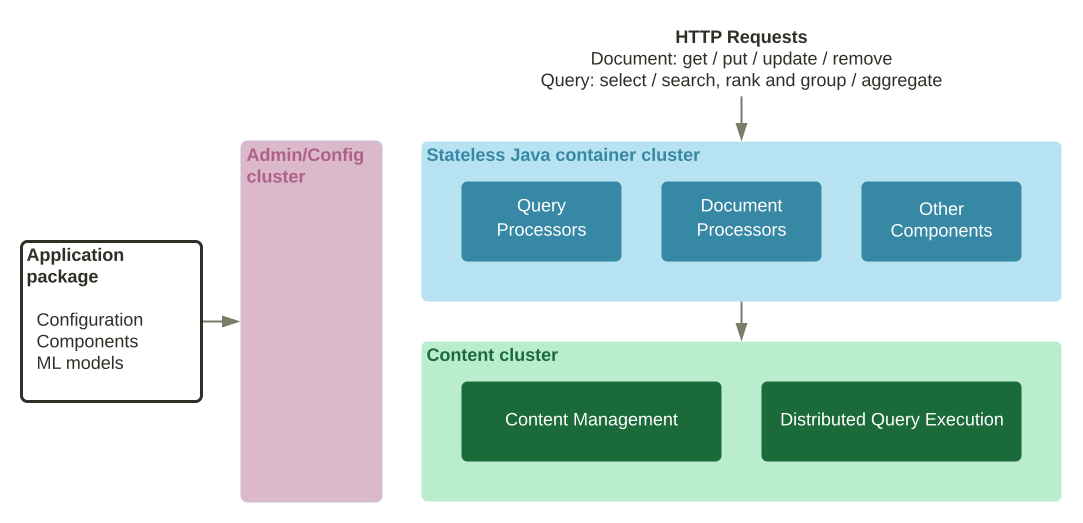
Note that "container" is an overloaded concept in Vespa - in this guide it refers to service instance nodes in blue.
Refer to [container metrics](../metrics.html#container-metrics).
## Endpoints
Container service(s) hosts the query and feed endpoints - examples:
- [album-recommendation](https://github.com/vespa-engine/sample-apps/blob/master/album-recommendation/app/services.xml) configures \_both\_ query and feed in the same container cluster (i.e. service):
```
```
```
```
- [multinode-HA](https://github.com/vespa-engine/sample-apps/blob/master/examples/operations/multinode-HA/services.xml) configures query and feed in separate container clusters (i.e. services):
```
```
```
```
Observe that `` and `` are located in separate clusters in the second example, and endpoints are therefore different.
**Important:** The first thing to validate when troubleshooting query errors is to make sure that the endpoint is correct, i.e. that query requests hit the correct nodes. A query will be written to the [access log](../../access-logging.html)on one of the nodes in the container cluster
## Inspecting Vespa Java Services using JConsole
Determine the state of each running Java Vespa service using JConsole. JConsole is distributed along with the Java developer kit. Start JConsole:
```
$ jconsole :
```
where the host and port determine which service to attach to. For security purposes the JConsole tool can not directly attach to Vespa services from external machines.
### Connecting to a Vespa instance
To attach a JConsole to a Vespa service running on another host, create a tunnel from the JConsole host to the Vespa service host. This can for example be done by setting up two SSH tunnels as follows:
```
$ ssh -N -L:localhost: &
$ ssh -N -L:localhost: &
```
where port1 and port2 are determined by the type of service (see below). A JConsole can then be attached to the service as follows:
```
$ jconsole localhost:
```
Port numbers:
| Service | Port 1 | Port 2 |
| --- | --- | --- |
| QRS | 19015 | 19016 |
| Docproc | 19123 | 19124 |
Updated port information can be found by running:
```
$[vespa-model-inspect](../../reference/tools-self-managing.html#vespa-model-inspect)service
```
where the resulting RMIREGISTRY and JMX lines determine port1 and port2, respectively.
### Examining thread states
The state of each container is available in JConsole by pressing the Threads tab and selecting the thread of interest in the threads list. Threads of interest includes _search_, _connector_, _closer_, _transport_ and _acceptor_ (the latter four are used for backend communications).
Copyright © 2025 - [Cookie Preferences](#)