# Embedding
A common technique is to map unstructured data - say, text or images - to points in an abstract vector space and then do the computation in that space. For example, retrieve similar data by [finding nearby points in the vector space](../querying/approximate-nn-hnsw), or [using the vectors as input to a neural net](../ranking/onnx). This mapping is referred to as _embedding_. Read more about embedding and embedding management in this [blog post](https://blog.vespa.ai/tailoring-frozen-embeddings-with-vespa/).
Embedding vectors can be sent to Vespa in queries and writes:

Alternatively, you can use the `embed` function to generate the embeddings inside Vespa to reduce vector transfer costs and make clients simpler:
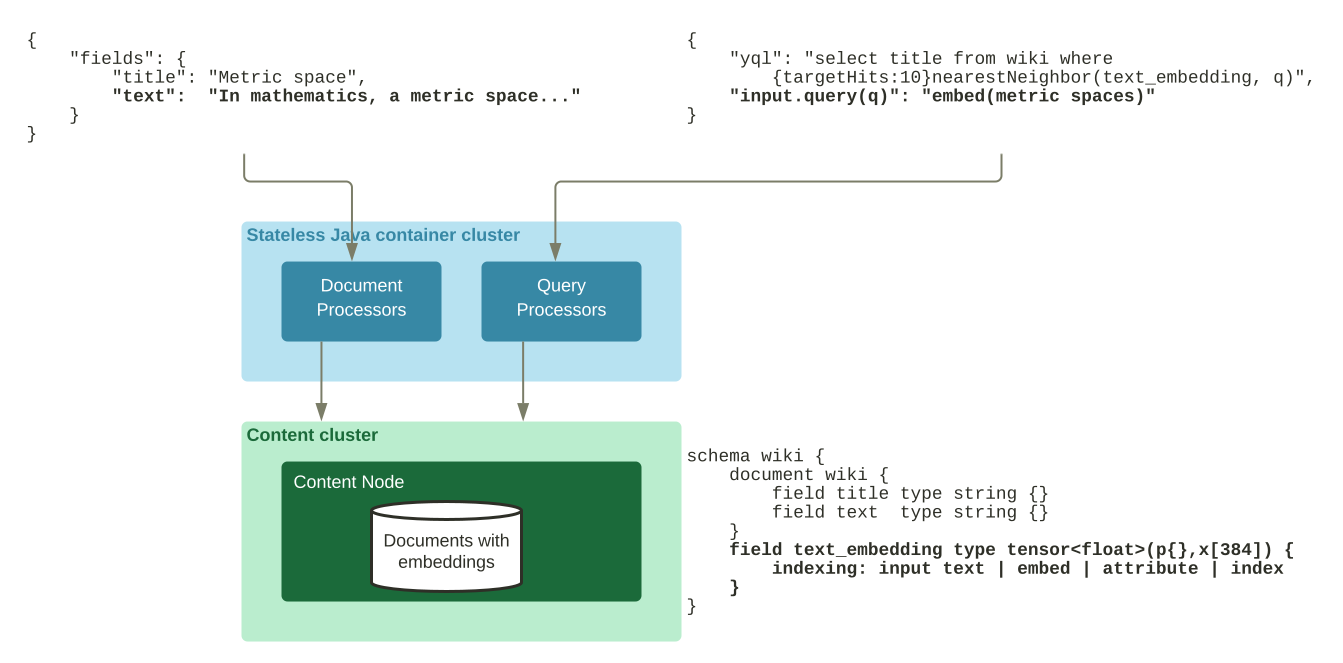
Adding embeddings to schemas will change the characteristics of an application; Memory usage will grow, and feeding latency might increase. Read more on how to address this in [binarizing vectors](../rag/binarizing-vectors).
## Configuring embedders
Embedders are [components](../applications/components.html) which must be configured in your[services.xml](../reference/services.html). Components are shared and can be used across schemas.
```
```
query:
passage:
...
```
```
You can [write your own](https://javadoc.io/doc/com.yahoo.vespa/linguistics/latest/com/yahoo/language/process/Embedder.html), or use [embedders provided in Vespa](#provided-embedders).
## Embedding a query text
Where you would otherwise supply a tensor in a query request, you can (with an embedder configured) instead supply any text enclosed in `embed()`:
```
input.query(q)=embed(myEmbedderId, "Hello%20world")
```
Both single and double quotes are permitted, and if you have only configured a single embedder, you can skip the embedder id argument and the quotes.
The text argument can be supplied by a referenced parameter instead, using the `@parameter` syntax:
```
```
{
"yql": "select * from doc where {targetHits:10}nearestNeighbor(embedding_field, query_embedding)",
"text": "my text to embed",
"input.query(query_embedding)": "embed(@text)",
}
```
```
Remember that regardless of whether you are using embedders, input tensors must always be [defined in the schema's rank-profile](../reference/schema-reference.html#inputs).
## Embedding a document field
Use the `embed` function of the [indexing language](../reference/indexing-language-reference.html#indexing-statement)to convert strings into embeddings:
```
schema doc {
document doc {
field title type string {
indexing: summary | index
}
}
field embeddings type tensor(x[384]) {
indexing {
input title |embed embedderId| attribute | index
}
}
}
```
Notice that the embedding field is defined outside the `document` clause in the schema. If you have only configured a single embedder, you can skip the embedder id argument.
The input field can also be an array, where the output becomes a rank two tensor, see[this blog post](https://blog.vespa.ai/semantic-search-with-multi-vector-indexing/):
```
schema doc {
document doc {
field chunks type array {
indexing: index | summary
}
}
field embeddings type tensor(p{},x[5]) {
indexing: input chunks |embed embedderId| attribute | index
}
}
```
## Provided embedders
Vespa provides several embedders as part of the platform.
### Huggingface Embedder
An embedder using any [Huggingface tokenizer](https://huggingface.co/docs/tokenizers/index), including multilingual tokenizers, to produce tokens which are then input to a supplied transformer model in [ONNX](https://onnx.ai/) model format:
```
```
...
```
```
The huggingface-embedder supports all[Huggingface tokenizer implementations](https://huggingface.co/docs/tokenizers/index).
- The `transformer-model` specifies the embedding model in [ONNX](https://onnx.ai/) format. See [exporting models to ONNX](../ranking/onnx#using-optimum-to-export-models-to-onnx-format) for how to export embedding models from Huggingface to be compatible with Vespa's `hugging-face-embedder`. See [Limitations on Model Size and Complexity](../ranking/onnx#limitations-on-model-size-and-complexity) for details on the ONNX model format supported by Vespa.
- The `tokenizer-model` specifies the Huggingface `tokenizer.json` formatted file. See [HF loading tokenizer from a JSON file.](https://huggingface.co/transformers/v4.8.0/fast_tokenizers.html#loading-from-a-json-file)
Use `path` to supply the model files from the application package,`url` to supply them from a remote server, or`model-id` to use a[model supplied by Vespa Cloud](https://cloud.vespa.ai/en/model-hub#hugging-face-embedder). You can also use a model hosted in private Huggingface Model Hub by adding your Huggingface API token to the [secret store](../cloud/security/secret-store) and referring to the secret using `secret-ref` in the model tag. See [model config reference](../reference/embedding-reference.html#model-config-reference) for more details.
```
```
...
```
```
See the [reference](../reference/embedding-reference.html#huggingface-embedder-reference-config)for all configuration parameters.
#### Huggingface embedder models
The following are examples of text embedding models that can be used with the hugging-face-embedder and their output [tensor](../ranking/tensor-user-guide.html) dimensionality. The resulting [tensor type](../reference/tensor.html#tensor-type-spec) can be `float`, `bfloat16` or using binarized quantization into `int8`. See blog post [Combining matryoshka with binary-quantization](https://blog.vespa.ai/combining-matryoshka-with-binary-quantization-using-embedder/) for more examples of using the Huggingface embedder with binary quantization.
The following models use `pooling-strategy` `mean`, which is the default [pooling-strategy](../reference/embedding-reference.html#huggingface-embedder-reference-config):
- [intfloat/e5-small-v2](https://huggingface.co/intfloat/e5-small-v2) produces `tensor(x[384])`
- [intfloat/e5-base-v2](https://huggingface.co/intfloat/e5-base-v2) produces `tensor(x[768])`
- [intfloat/e5-large-v2](https://huggingface.co/intfloat/e5-large-v2) produces `tensor(x[1024])`
- [intfloat/multilingual-e5-base](https://huggingface.co/intfloat/multilingual-e5-base) produces `tensor(x[768])`
The following models are useful for binarization and Matryoshka dimensionality flexibility where only the first k dimensions are retained. [Matryoshka 🤝 Binary vectors: Slash vector search costs with Vespa](https://blog.vespa.ai/combining-matryoshka-with-binary-quantization-using-embedder/) is a great read on this subject. When enabling binarization with `int8` use [distance-metric hamming](../reference/schema-reference.html#hamming):
- [mxbai-embed-large-v1](https://huggingface.co/mixedbread-ai/mxbai-embed-large-v1) produces `tensor(x[1024])`. This model is also useful for binarization, which can be triggered by using destination `tensor(x[128])`. Use `pooling-strategy` `cls` and `normalize` `true`.
- [nomic-embed-text-v1.5](https://huggingface.co/nomic-ai/nomic-embed-text-v1.5) produces `tensor(x[768])`. This model is also useful for binarization, which can be triggered by using destination `tensor(x[96])`. Use `normalize` `true`.
Snowflake arctic model series:
- [snowflake-arctic-embed-xs](https://huggingface.co/Snowflake/snowflake-arctic-embed-xs) produces `tensor(x[384])`. Use `pooling-strategy` `cls` and `normalize` `true`.
- [snowflake-arctic-embed-m](https://huggingface.co/Snowflake/snowflake-arctic-embed-m) produces `tensor(x[768])`. Use `pooling-strategy` `cls` and `normalize` `true`.
All of these example text embedding models can be used in combination with Vespa's[nearest neighbor search](../querying/nearest-neighbor-search)using the appropriate [distance-metric](../reference/schema-reference.html#distance-metric). Notice that to use the [distance-metric: prenormalized-angular](../reference/schema-reference.html#prenormalized-angular), the `normalize` configuration must be set to `true`.
Check the [Massive Text Embedding Benchmark](https://huggingface.co/blog/mteb) (MTEB) benchmark and[MTEB leaderboard](https://huggingface.co/spaces/mteb/leaderboard)for help with choosing an embedding model.
### Bert embedder
DEPRECATED; prefer using the [Huggingface Embedder](#huggingface-embedder) instead of the Bert embedder.
An embedder using the [WordPiece](../reference/embedding-reference.html#wordpiece-embedder) embedder to produce tokens which are then input to a supplied [ONNX](https://onnx.ai/) model on the form expected by a BERT base model:
```
```
128
last_hidden_state
```
```
- The `transformer-model` specifies the embedding model in [ONNX](https://onnx.ai/) format. See [exporting models to ONNX](../ranking/onnx#using-optimum-to-export-models-to-onnx-format), for how to export embedding models from Huggingface to compatible [ONNX](https://onnx.ai/) format.
- The `tokenizer-vocab` specifies the Huggingface `vocab.txt` file, with one valid token per line. Note that the Bert embedder does not support the `tokenizer.json` formatted tokenizer configuration files. This means that tokenization settings like max tokens should be set explicitly.
- The `transformer-output` specifies the name given to to embedding output in the `model.onnx` file; this will differ depending on how the model is exported to ONNX format. One common name is `last_hidden_state`, especially in transformer-based models. Other common names are `output` or `output_0`, `embedding` or `embeddings`, `sentence_embedding`, `pooled_output`, or `encoder_last_hidden_state`. The default is `output_0`.
The Bert embedder is limited to English ([WordPiece](../reference/embedding-reference.html#wordpiece-embedder)) and BERT-styled transformer models with three model inputs (_input\_ids, attention\_mask, token\_type\_ids_). Prefer using the [Huggingface Embedder](#huggingface-embedder) instead of the Bert embedder.
See [configuration reference](../reference/embedding-reference.html#bert-embedder-reference-config) for all configuration options.
### ColBERT embedder
An embedder supporting [ColBERT](https://github.com/stanford-futuredata/ColBERT) models. The ColBERT embedder maps text to _token_ embeddings, representing a text as multiple contextualized embeddings. This produces better quality than reducing all tokens into a single vector.
Read more about ColBERT and the ColBERT embedder in blog post form [Announcing the Vespa ColBERT embedder](https://blog.vespa.ai/announcing-colbert-embedder-in-vespa/) and [Announcing Vespa Long-Context ColBERT](https://blog.vespa.ai/announcing-long-context-colbert-in-vespa/).
```
```
32
128
```
```
- The `transformer-model` specifies the ColBERT embedding model in [ONNX](https://onnx.ai/) format. See [exporting models to ONNX](../ranking/onnx#using-optimum-to-export-models-to-onnx-format) for how to export embedding models from Huggingface to compatible [ONNX](https://onnx.ai/) format. The [vespa-engine/col-minilm](https://huggingface.co/vespa-engine/col-minilm) page on the HF model hub has a detailed example of how to export a colbert checkpoint to ONNX format for accelerated inference.
- The `tokenizer-model` specifies the Huggingface `tokenizer.json` formatted file. See [HF loading tokenizer from a JSON file.](https://huggingface.co/transformers/v4.8.0/fast_tokenizers.html#loading-from-a-json-file)
- The `max-query-tokens` controls the maximum number of query text tokens that are represented as vectors, and similarly, `max-document-tokens` controls the document side. These parameters can be used to control resource usage.
See [configuration reference](../reference/embedding-reference.html#colbert-embedder-reference-config) for all configuration options and defaults.
The ColBERT token embeddings are represented as a[mixed tensor](../ranking/tensor-user-guide.html#tensor-concepts): `tensor(token{}, x[dim])` where`dim` is the vector dimensionality of the contextualized token embeddings. The [colbert model checkpoint](https://huggingface.co/colbert-ir/colbertv2.0) on Hugging Face hub uses 128 dimensions.
The embedder destination tensor is defined in the [schema](../basics/schemas.html), and depending on the target [tensor cell precision](../reference/tensor.html#tensor-type-spec) definition the embedder can compress the representation: If the target tensor cell type is `int8`, the ColBERT embedder compresses the token embeddings with binarization for the document to reduce storage to 1-bit per value, reducing the token embedding storage footprint by 32x compared to using float. The _query_ representation is not compressed with binarization. The following demonstrates two ways to use the ColBERT embedder in the document schema to [embed a document field](#embedding-a-document-field).
```
schema doc {
document doc {
field text type string {..}
}
field colbert_tokens type tensor(token{}, x[128]) {
indexing: input text | embed colbert | attribute
}
field colbert_tokens_compressed type tensor(token{}, x[16]) {
indexing: input text | embed colbert | attribute
}
}
```
The first field `colbert_tokens` stores the original representation as the tensor destination cell type is float. The second field, the `colbert_tokens_compressed` tensor is compressed. When using `int8` tensor cell precision, one should divide the original vector size by 8 (128/8 = 16).
You can also use `bfloat16` instead of `float` to reduce storage by 2x compared to `float`.
```
field colbert_tokens type tensor(token{}, x[128]) {
indexing: input text | embed colbert | attribute
}
```
You can also use the ColBERT embedder with an array of strings (representing chunks):
```
schema doc {
document doc {
field chunks type array {..}
}
field colbert_tokens_compressed type tensor(chunk{}, token{}, x[16]) {
indexing: input text | embed colbert chunk | attribute
}
}
```
Here, we need a second mapped dimension in the target tensor and a second argument to embed, telling the ColBERT embedder the name of the tensor dimension to use for the chunks.
Notice that the examples above did not specify the `index` function for creating a[HNSW](../querying/approximate-nn-hnsw) index. The colbert representation is intended to be used as a ranking model and not for retrieval with Vespa's nearestNeighbor query operator, where you can e.g., use a document-level vector and/or lexical matching.
To reduce memory footprint, use [paged attributes](../content/attributes.html#paged-attributes).
#### ColBERT ranking
See the sample applications for using ColBERT in ranking with variants of the MaxSim similarity operator expressed using Vespa tensor computation expressions. See:[colbert](https://github.com/vespa-engine/sample-apps/tree/master/colbert) and [colbert-long](https://github.com/vespa-engine/sample-apps/tree/master/colbert-long).
### SPLADE embedder
An embedder supporting [SPLADE](https://github.com/naver/splade) models. The SPLADE embedder maps text to mapped tensor, representing a text as a sparse vector of unique tokens and their weights.
```
```
```
```
- The `transformer-model` specifies the SPLADE embedding model in [ONNX](https://onnx.ai/) format. See [exporting models to ONNX](../ranking/onnx#using-optimum-to-export-models-to-onnx-format) for how to export embedding models from Huggingface to compatible [ONNX](https://onnx.ai/) format.
- The `tokenizer-model` specifies the Huggingface `tokenizer.json` formatted file. See [HF loading tokenizer from a JSON file.](https://huggingface.co/transformers/v4.8.0/fast_tokenizers.html#loading-from-a-json-file)
See [configuration reference](../reference/embedding-reference.html#splade-embedder-reference-config) for all configuration options and defaults.
The splade token weights are represented as a [mapped tensor](../ranking/tensor-user-guide.html#tensor-concepts): `tensor(token{})`.
The embedder destination tensor is defined in the [schema](../basics/schemas.html). The following demonstrates how to use the SPLADE embedder in the document schema to [embed a document field](#embedding-a-document-field).
```
schema doc {
document doc {
field text type string {..}
}
field splade_tokens type tensor(token{}) {
indexing: input text | embed splade | attribute
}
}
```
You can also use the SPLADE embedder with an array of strings (representing chunks). Here, also using lower tensor cell precision `bfloat16`:
```
schema doc {
document doc {
field chunks type array {..}
}
field splade_tokens type tensor(chunk{}, token{}) {
indexing: input text | embed splade chunk | attribute
}
}
```
Here, we need a second mapped dimension in the target tensor and a second argument to embed, telling the splade embedder the name of the tensor dimension to use for the chunks.
To reduce memory footprint, use [paged attributes](../content/attributes.html#paged-attributes).
#### SPLADE ranking
See the [splade](https://github.com/vespa-engine/sample-apps/tree/master/splade) sample application for how to use SPLADE in ranking, including also how to use the SPLADE embedder with an array of strings (representing chunks).
## Embedder performance
Embedding inference can be resource-intensive for larger embedding models. Factors that impact performance:
- The embedding model parameters. Larger models are more expensive to evaluate than smaller models.
- The sequence input length. Transformer models scale quadratically with input length. Since queries are typically shorter than documents, embedding queries is less computationally intensive than embedding documents.
- The number of inputs to the `embed` call. When encoding arrays, consider how many inputs a single document can have. For CPU inference, increasing [feed timeout](../reference/document-v1-api-reference.html#timeout) settings might be required when documents have many `embed`inputs.
Using [GPU](../reference/embedding-reference.html#embedder-onnx-reference-config), especially for longer sequence lengths (documents), can dramatically improve performance and reduce cost. See the blog post on [GPU-accelerated ML inference in Vespa Cloud](https://blog.vespa.ai/gpu-accelerated-ml-inference-in-vespa-cloud/). With GPU-accelerated instances, using fp16 models instead of fp32 can increase throughput by as much as 3x compared to fp32.
Refer to [binarizing vectors](../rag/binarizing-vectors) for how to reduce vector size.
## Metrics
Vespa's built-in embedders emit metrics for computation time and token sequence length. These metrics are prefixed with `embedder.`and listed in the [Container Metrics](../reference/container-metrics-reference.html) reference documentation. Third-party embedder implementations may inject the `ai.vespa.embedding.Embedder.Runtime` component to easily emit the same predefined metrics, although emitting custom metrics is perfectly fine.
## Sample applications
These sample applications use embedders:
- [commerce-product-ranking](https://github.com/vespa-engine/sample-apps/tree/master/commerce-product-ranking) - demonstrates using multiple embedders
- [multi-vector-indexing](https://github.com/vespa-engine/sample-apps/tree/master/multi-vector-indexing) demonstrates how to use embedders with multiple document field inputs
- [colbert](https://github.com/vespa-engine/sample-apps/tree/master/colbert) demonstrates how to use the colbert-embedder
- [colbert-long](https://github.com/vespa-engine/sample-apps/tree/master/colbert-long) demonstrates how to use the colbert-embedder with long contexts (array input)
- [splade](https://github.com/vespa-engine/sample-apps/tree/master/splade) demonstrates how to use the splade-embedder.
## Tricks and tips
Various tricks that are useful with embedders.
### Adding a fixed string to a query text
Embedding models might require text to be prepended with a fixed string, e.g.:
```
```
query:
passage:
```
```
The above configuration prepends text in queries and field data. Find a complete example in the [ColBERT](https://github.com/vespa-engine/sample-apps/tree/master/colbert) sample application.
An alternative approach is using query profiles to prepend query data. If you need to add a standard wrapper or a prefix instruction around the input text you want to embed use parameter substitution to supply the text, as in `embed(myEmbedderId, @text)`, and let the parameter (`text` here) be defined in a [query profile](../querying/query-profiles.html), which in turn uses [value substitution](../querying/query-profiles.html#value-substitution) to place another query request with a supplied text value within it. The following is a concrete example where queries should have a prefix instruction before being embedded in a vector representation. The following defines a `text` input field to `search/query-profiles/default.xml`:
```
```
"Represent this sentence for searching relevant passages: %{user_query}
```
```
Then, at query request time, we can pass `user_query` as a request parameter, this parameter is then used to produce the `text` value which then is embedded.
```
```
{
"yql": "select * from doc where userQuery() or ({targetHits: 100}nearestNeighbor(embedding, e))",
"input.query(e)": "embed(mxbai, @text)",
"user_query": "space contains many suns"
}
```
```
The text that is embedded by the embedder is then:_Represent this sentence for searching relevant passages: space contains many suns_.
### Concatenating input fields
You can concatenate values in indexing using "`.`", and handle missing field values using [choice](../writing/indexing.html#choice-example) to produce a single input for an embedder:
```
schema doc {
document doc {
field title type string {
indexing: summary | index
}
field body type string {
indexing: summary | index
}
}
field embeddings type tensor(x[384]) {
indexing {
(input title || "") . " " . (input body || "") |embed embedderId| attribute | index
}
index: hnsw
}
}
```
You can also use concatenation to add a fixed preamble to the string to embed.
### Combining with foreach
The indexing expression can also use `for_each` and include other document fields. For example, the _E5_ family of embedding models uses instructions along with the input. The following expression prefixes the input with _passage:_ followed by a concatenation of the title and a text chunk.
```
schema doc {
document doc {
field title type string {
indexing: summary | index
}
field chunks type array {
indexing: index | summary
}
}
field embedding type tensor(p{}, x[384]) {
indexing {
input chunks |
for_each {
"passage: " . (input title || "") . " " . ( _ || "")
} | embed e5 | attribute | index
}
attribute {
distance-metric: prenormalized-angular
}
}
}
```
See [Indexing language execution value](../writing/indexing.html#execution-value-example)for details.
## Troubleshooting
This section covers common issues and how to resolve them.
### Model download failure
If models fail to download, it will cause the Vespa stateless container service to not start with `RuntimeException: Not able to create config builder for payload` - see [example](../applications/components.html#component-load).
This usually means that the model download failed. Check the Vespa log for more details. The most common reasons for download failure are network issues or incorrect URLs.
This will also be visible in the Vespa status output as the container will not listen to its port:
```
vespa status -t http://127.0.0.1:8080
Container at http://127.0.0.1:8080 is not ready: unhealthy container at http://127.0.0.1:8080/status.html: Get "http://127.0.0.1:8080/status.html": EOF
Error: services not ready: http://127.0.0.1:8080
```
### Tensor shape mismatch
The native embedder implementations expect that the output tensor has a specific shape. If the shape is incorrect, you will see an error message during feeding like:
```
feed: got status 500 ({"pathId":"..","..","message":"[UNKNOWN(252001) @ tcp/vespa-container:19101/chain.indexing]:
Processing failed. Error message: java.lang.IllegalArgumentException: Expected 3 output dimensions for output name 'sentence_embedding': [batch, sequence, embedding], got 2 -- See Vespa log for details. "}) for put xx:not retryable
```
This means that the exported ONNX model output tensor does not have the expected shape. For example, the above is logged by the [hf-embedder](#huggingface-embedder) that expects the output shape to be [batch, sequence, embedding] (A 3D tensor). This is because the embedder implementation performs the [pooling-strategy](../reference/embedding-reference.html#huggingface-embedder) over the sequence dimension to produce a single embedding vector. The batch size is always 1 for Vespa embeddings.
See [onnx export](../ranking/onnx#using-optimum-to-export-models-to-onnx-format) for how to export models to ONNX format with the correct output shapes and[onnx debug](../ranking/onnx#debugging-onnx-models) for debugging input and output names.
### Input names
The native embedder implementations expect that the ONNX model accepts certain input names. If the names are incorrect, it will cause the Vespa container service to not start, and you will see an error message in the vespa log like:
```
WARNING container Container.com.yahoo.container.di.Container
Caused by: java.lang.IllegalArgumentException: Model does not contain required input: 'input_ids'. Model contains: my_input
```
This means that the ONNX model accepts "my\_input", while our configuration attempted to use "input\_ids". The default input names for the [hf-embedder](#huggingface-embedder) are "input\_ids", "attention\_mask" and "token\_type\_ids". These are overridable in the configuration ([reference](../reference/embedding-reference.html#huggingface-embedder)). Some embedding models do not use the "token\_type\_ids" input. We can specify this in the configuration by setting `transformer-token-type-ids` to empty, illustrated by the following example.
```
```
```
```
### Output names
The native embedder implementations expect that the ONNX model produces certain output names. It will cause the Vespa stateless container service to not start, and you will see an error message in the vespa log like:
```
Model does not contain required output: 'test'. Model contains: last_hidden_state
```
This means that the ONNX model produces "last\_hidden\_state", while our configuration attempted to use "test". The default output name for the [hf-embedder](#huggingface-embedder) is "last\_hidden\_state". This is overridable in the configuration. See [reference](../reference/embedding-reference.html#huggingface-embedder).
### EOF
If vespa status shows that the container is healthy, but you observe an EOF error during feeding, this means that the stateless container service has crashed and stopped listening to its port. This could be related to the embedder ONNX model size, docker container memory resource constraints, or the configured JVM heap size of the Vespa stateless container service.
```
vespa feed ext/1.json
feed: got error "Post "http://127.0.0.1:8080/document/v1/doc/doc/docid/1": unexpected EOF" (no body) for put id:doc:doc::1: giving up after 10 attempts
```
This could be related to insufficient stateless container (JVM) memory. Check the container logs for OOM errors. See [jvm-tuning](../performance/container-tuning.html#jvm-tuning) for JVM tuning options (The default heap size is 1.5GB). Container crashes could also be caused by too little memory allocated to the docker or podman container, which can cause the Linux kernel to kill processes to free memory. See the [docker containers memory](../operations/self-managed/docker-containers.html#memory) documentation.
Copyright © 2025 - [Cookie Preferences](#)
### On this page:
- [Configuring embedders](#configuring-embedders)
- [Embedding a query text](#embedding-a-query-text)
- [Embedding a document field](#embedding-a-document-field)
- [Provided embedders](#provided-embedders)
- [Huggingface Embedder](#huggingface-embedder)
- [Bert embedder](#bert-embedder)
- [ColBERT embedder](#colbert-embedder)
- [SPLADE embedder](#splade-embedder)
- [Embedder performance](#embedder-performance)
- [Metrics](#metrics)
- [Sample applications](#sample-applications)
- [Tricks and tips](#tricks-and-tips)
- [Adding a fixed string to a query text](#adding-a-fixed-string-to-a-query-text)
- [Concatenating input fields](#concatenating-input-fields)
- [Combining with foreach](#combining-with-foreach)
- [Troubleshooting](#troubleshooting)
- [Model download failure](#model-download-failure)
- [Tensor shape mismatch](#tensor-shape-mismatch)
- [Input names](#input-names)
- [Output names](#output-names)
- [EOF](#EOF)