Vespa CloudThis content is applicable to Vespa Cloud deployments.
Autoscaling
Autoscaling lets you adjust the hardware resources allocated to application clusters automatically
depending on actual usage.
It will attempt to keep utilization of all allocated resources close to ideal,
and will automatically reconfigure to the cheapest option allowed by the ranges when necessary.
You can turn it on by specifying ranges in square brackets for the
nodes and/or
node resource values in services.xml.
Vespa Cloud will monitor the resource utilization of your clusters
and automatically choose the cheapest resource allocation within ranges that produces close to optimal utilization.
You can see the status and recent actions of the autoscaler in the Resources view
under a deployment in the console.
Autoscaling is not considering latency differences achieved by different configurations.
If your application has certain configurations that produce good throughput but too high latency,
you should not include these configurations in your autoscaling ranges.
Adjusting the allocation of a cluster may happen quickly for stateless container clusters,
and much more slowly for content clusters with a lot of data. Autoscaling will adjust each cluster
on the timescale it typically takes to rescale it (including any data redistribution).
The ideal utilization takes into account that a node may be down or failing,
that another region may be down causing doubling of traffic,
and that we need headroom for maintenance operations and handling requests with low latency.
It acts on what it has observed on your system in the recent past.
If you need much more capacity in the near future than you do currently,
you may want to set the lower limit to take this into account.
Upper limits should be set to the maximum size that makes business sense.
When to use autoscaling
Autoscaling is useful in a number of scenarios. Some typical ones are:
You have a new application which you can't benchmark with realistic data and usage,
making you unsure what resources to allocate:
Set wide ranges for all resource parameters and let the system choose a configuration. Once you gain experience
you can consider tightening the configuration space.
You have load that varies quickly during the day, or that may suddenly increase quickly due to some event,
and want container cluster resources to quickly adjust to the load:
Set a range for the number of nodes and/or vcpu on containers.
You expect your data volume to grow over time, but you don't want to allocate resources prematurely,
nor constantly worry about whether it is time to increase: Configure ranges for content nodes and/or node
resources such that the size of the system grows with the data.
Resource tradeoffs
Some other considerations when deciding resources:
Making changes to resources/nodes is easy and safe, and one of Vespa Cloud's strengths.
We advise you make controlled changes and observe effect on latencies, data migration and cost.
Everything is automated, just deploy a new application package.
This is useful learning when later needed during load peaks and capacity requirement changes.
Node resources cannot be chosen freely in all zones, CPU/Memory often comes in increments of x 2.
Try to make sure that the resource configuration is a good fit.
CPU is the most expensive component, optimize for this for most applications.
Having few nodes means more overcapacity as Vespa requires that the system will handle
one node being down (or one group, in content clusters having multiple groups).
4-5 nodes minimum is a good rule of thumb.
Whether 4-5 or 9-10 nodes of half the size is better depends on
quicker upgrade cycles vs. smoother resource auto-scale curves.
Latencies can be better or worse, depending on static vs dynamic query cost.
Changing a node resource may mean allocating a new node, so it may be faster to scale
container nodes by changing the number of nodes.
As a consequence, during resource shortage (say almost full disk),
add nodes and keep the rest unchanged.
It is easiest to reason over capacity when changing one thing at a time.
It is often safe to follow the suggested resources advice when shown in the console
and feel free to contact us if you have questions.
Mixed load
A Vespa application must handle a combination of reads and writes, from multiple sources.
User load often resembles a sine-like curve.
Machine-generated load, like a batch job, can be spiky and abrupt.
In the default Vespa configuration, all kinds of load uses one default container cluster.
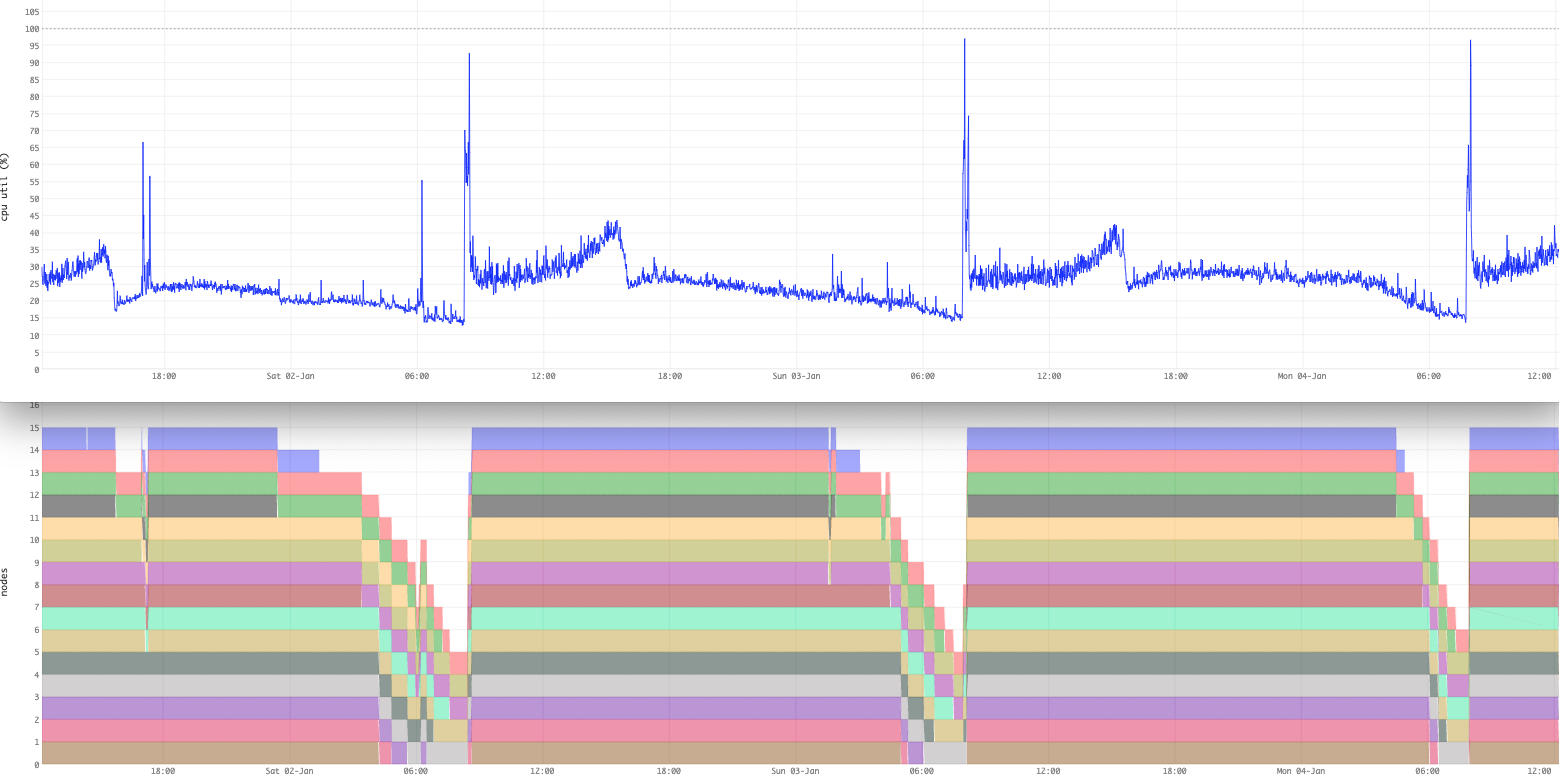
Example: An application where daily batch jobs update the corpus at high rate:
Autoscaling scales up much quicker than down, as the probability of a new spike
is higher after one has been observed.
In this example, see the rapid cluster growth for the daily load spike -
followed by a slow decay.
The best solution for this case is to slow down the batch job, as it is of short duration.
It is not always doable to slow down jobs - in these cases, setting up multiple
container clusters
can be a smart thing - optimize each cluster for its load characteristics.
This could be a combination of clusters using autoscale and clusters with a fixed size.
Autoscaling often works best for the user-generated load,
whereas the machine-generated load could either be tuned
or routed to a different cluster in the same Vespa application.
Examples
The examples below show recommended starting points per cluster type.
As a rule of thumb, container clusters can autoscale on any dimension,
while content clusters work best with fixed node resources and a range
on the number of nodes or groups.
Container clusters
Container clusters are stateless, so nodes can be added, removed or
replaced quickly, and no data needs to move.
Scaling the number of nodes is the simplest option and a good starting point:
You can also let autoscaling choose the node resources within ranges.
Changing node resources usually means replacing nodes,
but for a container cluster this causes little overhead:
Content clusters hold data, so scaling them means redistributing documents.
Changing vcpu, memory or disk usually leads to allocating new nodes to
fulfil the new node resource spec, replacing all nodes in the cluster and
redistributing all documents.
Keep node resources fixed and autoscale the number of nodes instead -
then only the data on added or removed nodes has to move:
This scales between 2 and 4 groups of 8 nodes each, 16 to 32 nodes in total.
Since each query is handled by a single group, query capacity scales with
the number of groups, and adding a group populates the new group without
redistributing documents between the existing nodes.
Important:
Autoscaling node resources (vcpu, memory, disk)
in a content cluster is supported, but each resource change replaces all nodes
and redistributes all documents, which might impact service quality to some degree.
Using paged attributes or
HNSW indexes makes redistribution more expensive and time-consuming.
Note:
Avoid autoscaling during the initial feeding of a
cluster, as changing the topology will require redistribution of documents,
possibly several times - see
initial batch feed.
Avoid ranges on every dimension
For completeness, this is a configuration to avoid, in particular for content clusters:
As node resources often come in increments of x2, these ranges span
7 node counts x 3 vcpu x 3 memory x 3 disk steps -
around 190 configurations the autoscaler can choose between.
For a content cluster, every move between configurations with different
node resources replaces all nodes and redistributes all documents.
Wide ranges on many dimensions mostly give the autoscaler more expensive
ways to reach the same utilization - prefer scaling a single dimension,
and see resource tradeoffs.
GPU resources
Note that at the moment it is not possible to autoscale GPU
resources per node, but you can scale the number of nodes
with GPUs:
Autoscaling requires a cluster of at least two nodes -
single-node clusters are not autoscaled.
Ranges only take effect in production zones.
The dev environment ignores
nodes and resources settings by default.
Set the lower bound of a range close to your normal baseline load -
a very wide range lets the autoscaler shed many nodes in quiet periods,
making the swing back on the next load peak larger and slower.