-
Applications and components
- Developer guide
- IDE support
- Deployment
- .vespaignore files
- Containers
- Components
- Searchers
- Document processors
- Request handlers
- Result renderers
- Dependency injection
- Configuring components
- Chaining
- Inspecting structured data in a Searcher
- Developing web services
- Unit testing
- System testing
- The config system
- Request-response processing
- Bundles
- Using ZooKeeper
- Http servers and filters
- Using pluggable frameworks
- Java config API
-
Querying
- The query api
- The YQL query language
- Grouping and aggregation
- Query profiles
- An intro to vector search
- Nearest neighbor search
- Approximate nearest neighbor search
- Nearest neighbor search guide
- Text matching
- Searching multivalue fields
- Geo search
- Document summaries
- Result diversity
- Federation
- Page templates
- Filter intersections
-
Ranking and inference
- Ranking introduction
- Ranking expressions and features
- Multivalue query operators
- Tensor user guide
- Tensor examples
- Phased ranking
- Using TensorFlow models
- Using ONNX models
- Using XGBoost models
- Using LightGBM models
- Wand: Accelerated OR search
- The BM25 rank feature
- The nativeRank rank feature
- Cross-encoder transformer ranking
- Searcher re-ranking
- Significance model
- Stateless model evaluation
-
Linguistics and text processing
-
Content and elasticity
-
Performance
- Performance overview
- Practical performance guide
- Serving sizing guide
- Feed sizing guide
- Node resources
-
Instance types
- Topology and resizing
- Streaming search
- Benchmarking
- Benchmarking using Vespa Cloud
- Memory visualizer
- Profiling
- Container tuning
- Rate-limiting queries
- Graceful degradation
- Caches
- HTTP performance testing
- HTTP/2
- Feature tuning
- Valgrind
-
Operations
- Quota
- Environments
- Zones
- Availability Zones
- Production deployment
- Deployment variants
- Automated deployments
- Autoscaling
-
Enclave: Bring your own cloud
- Reindexing
- Reindexing on Vespa Cloud
- Data management and backup
- Cloning applications and data
- Monitoring
- Metrics
- Telemetry export
- Notifications
- Support
- Login Help
- Single Sign-On (SSO) Setup
- Deployment patterns
- Private endpoints
- Endpoint routing
- Access logging
-
Artifact archive
- Deleting applications
-
Self-managed
- Admin procedures
- Multinode Systems
- Files, Processes, Ports, Environment
- Node Setup
- Build and install
- Monitoring
- Content node recovery
- Configuration Servers
- Live Vespa upgrade procedure
- Config Sentinel
- Config Proxy
- Docker Containers
- Docker Containers GPU setup
- CPU Support
- Service Location Broker
- Change from attribute to index procedure
- Container
- Sizing examples
- Vespa Support CLI
-
Kubernetes
- Introduction
-
Reference
-
Modules
-
Reference
-
Applications and components
-
Schemas and documents
-
Reading and writing
-
Operations
- Health checks
- Log files
- Tools
-
Self-managed
-
Security
-
Release notes
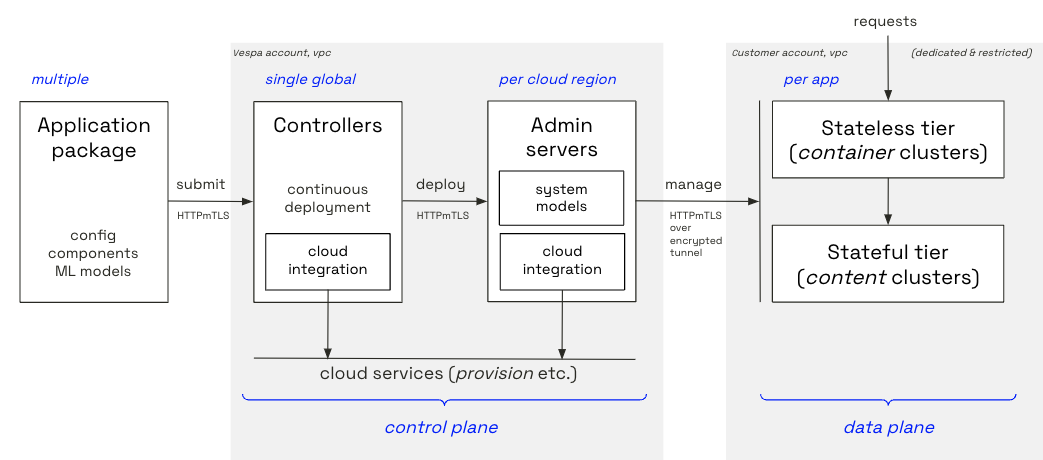
Vespa Cloud Enclave allows Vespa Cloud applications to run inside the tenant's own cloud accounts while everything is still fully managed by Vespa Cloud's automation, giving the tenant full access to Vespa Cloud features inside their own cloud account. This allows tenant data to always remain within the bounds of services controlled by the tenant, and also to build closer integrations with Vespa applications inside the cloud services.
Vespa Cloud Enclave is available in AWS, Azure, and GCP.
Note: As the Vespa Cloud Enclave resources run in your account, this incurs resource costs from your cloud provider in addition to the Vespa Cloud costs.
AWS
Azure
GCP
Guides
FAQ
Which kind of permission is needed for the Vespa control plane to access my AWS accounts / Azure subscriptions / GCP projects?
The permissions required are coded into the Terraform modules found at:
Navigate to the modules directory for details.
How can I configure agents/daemons on Vespa hosts securely?
Use terraform to grant Vespa hosts access to necessary secrets, and create an RPM that retrieves them and configures your application. See enclave-examples for a complete example.
Deployment failure: Could not provision …
This happens if you deploy to new zones before running the Terraform/CloudFormation templates:
Deployment failed: Invalid application: In container cluster 'mycluster': Could not provision load balancer mytenant:myapp:myinstance:mycluster: Expected to find exactly 1 resource, but got 0 for subnet with service 'tenantelb'
Do we need to take any actions when AWS sends us Amazon EC2 Instance Retirement, Amazon EC2 Instance Availability Issue, or Amazon EC2 Maintenance notifications,?
Vespa Cloud will take proactive actions on maintenance operations and replace instances that are scheduled for maintenance tasks ahead of time to reduce any impact the maintenance may incur.
All EC2 instance failures are detected by our control plane, and the problematic instances are automatically replaced. The system will, as part of the replacement process, also ensure that the document distribution is kept in line with your application configuration.
Does Vespa Cloud Enclave support VPC peering?
VPC peering is not supported; AWS PrivateLink and Google Private Service Connect are good alternatives, so you can access the endpoints without going over public internet. Read more.