-
Applications and components
- Developer guide
- IDE support
- Deployment
- .vespaignore files
- Containers
- Components
- Searchers
- Document processors
- Request handlers
- Result renderers
- Dependency injection
- Configuring components
- Chaining
- Inspecting structured data in a Searcher
- Developing web services
- Unit testing
- System testing
- The config system
- Request-response processing
- Bundles
- Using ZooKeeper
- Http servers and filters
- Using pluggable frameworks
- Java config API
-
Querying
- The query api
- The YQL query language
- Grouping and aggregation
- Query profiles
- An intro to vector search
- Nearest neighbor search
- Approximate nearest neighbor search
- Nearest neighbor search guide
- Text matching
- Searching multivalue fields
- Geo search
- Document summaries
- Result diversity
- Federation
- Page templates
- Filter intersections
-
Ranking and inference
- Ranking introduction
- Ranking expressions and features
- Multivalue query operators
- Tensor user guide
- Tensor examples
- Phased ranking
- Using TensorFlow models
- Using ONNX models
- Using XGBoost models
- Using LightGBM models
- Wand: Accelerated OR search
- The BM25 rank feature
- The nativeRank rank feature
- Cross-encoder transformer ranking
- Searcher re-ranking
- Significance model
- Stateless model evaluation
-
Linguistics and text processing
-
Content and elasticity
-
Performance
- Performance overview
- Practical performance guide
- Serving sizing guide
- Feed sizing guide
- Node resources
-
Instance types
- Topology and resizing
- Streaming search
- Benchmarking
- Benchmarking using Vespa Cloud
- Memory visualizer
- Profiling
- Container tuning
- Rate-limiting queries
- Graceful degradation
- Caches
- HTTP performance testing
- HTTP/2
- Feature tuning
- Valgrind
-
Operations
- Quota
- Environments
- Zones
- Availability Zones
- Production deployment
- Deployment variants
- Automated deployments
- Autoscaling
-
Enclave: Bring your own cloud
- Reindexing
- Reindexing on Vespa Cloud
- Data management and backup
- Cloning applications and data
- Monitoring
- Metrics
- Telemetry export
- Notifications
- Support
- Login Help
- Single Sign-On (SSO) Setup
- Deployment patterns
- Private endpoints
- Endpoint routing
- Access logging
-
Artifact archive
- Deleting applications
-
Self-managed
- Admin procedures
- Multinode Systems
- Files, Processes, Ports, Environment
- Node Setup
- Build and install
- Monitoring
- Content node recovery
- Configuration Servers
- Live Vespa upgrade procedure
- Config Sentinel
- Config Proxy
- Docker Containers
- Docker Containers GPU setup
- CPU Support
- Service Location Broker
- Change from attribute to index procedure
- Container
- Sizing examples
- Vespa Support CLI
-
Kubernetes
- Introduction
-
Reference
-
Modules
-
Reference
-
Applications and components
-
Schemas and documents
-
Reading and writing
-
Operations
- Health checks
- Log files
- Tools
-
Self-managed
-
Security
-
Release notes
Support options and other resources like status tracking are found at Vespa Support.
Create a support case
Open a support case using the support portal at support.vespa.ai.
Use this for:
- Production support (reads and writes)
- Deployment support (making changes to applications)
- Technical support (general, including user access)
- Feature requests
Use the support portal to track your ongoing cases.
In case of any problems with the support portal itself, mail support@vespa.ai.
You must be a registered user in your organization's tenant in the Vespa Console to create a support case.
Escalate a support case
Support response times are defined for the different support levels.
To escalate a support case for response within defined SLA, first create the case, then use "Escalate to oncall" to page the Vespa Team:
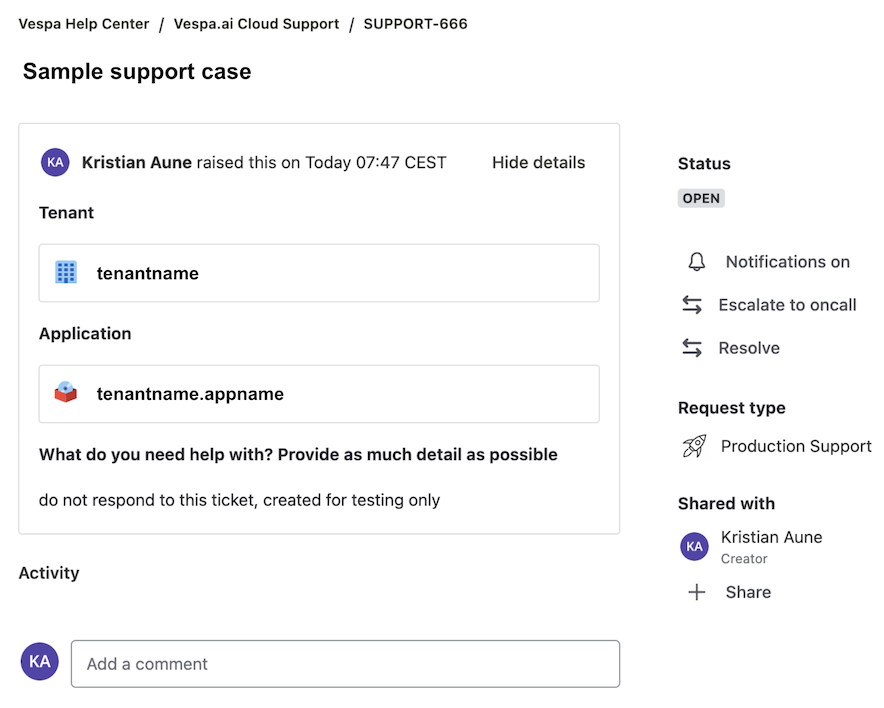
An escalation will be acknowledged in the support case ticket within support SLA. Note that non-escalated cases will be handled during regular business hours.
Depending on support level, your organization might have a shared Slack channel with the Vespa Team. Such a channel does not have an SLA, and does not replace the need to create a support ticket. The Slack channel is used on a best-effort basis and can be a useful tool in the support case process.
Incident management
Depending on the severity of a support case, the Vespa Team might create an incident.
A customer can request the incident process to be initiated in a support case.
Incident process
An incident creation triggers the incident process. When the incident is resolved, a root cause analysis (RCA) is performed.
During an incident, the support case is updated with relevant status at regular intervals:
- The teams can mutually agree to use a shared Slack-channel for status and coordinated work - in this case, the support case will have a link to the Slack channel
- The teams can mutually agree on next steps and timing, in the support case ticket or Slack channel.
Post-mortem
The incident process includes a post-mortem event. Post-mortems are held weekly, on cases that are closed at least two days before the post-mortem, and all relevant information for the post-mortem is made available.
Post-mortems are internal to Vespa.ai. A customer can request a joint post-mortem meeting after the Vespa.ai-internal post-mortem is completed.
A Post-mortem report is shared with the customer within 7 days of the post-mortem event.