An attribute is a schema keyword,
specifying the indexing for a field:
field price typeint{indexing:attribute}
Attribute properties and use cases:
Flexible match modes
including exact match, prefix match, and case-sensitive matching, but not text matching (tokenization and linguistic processing).
High sustained update rates (avoiding read-apply-write patterns). Any mutating operation against an attribute field
is written to Vespa's transaction log and persisted, but appending to the log is sequential access, not random.
Read more in partial updates.
Instant query updates - values are immediately searchable.
Document Summaries are memory-only operations if all fields are attributes.
An attribute is an in-memory data structure.
Attributes speed up query execution and document updates, trading off memory.
As data structures are regularly optimized, consider both static and temporary resource usage -
see attribute memory usage below.
Use attributes in document summaries to limit access to storage to generate result sets.
field titles typearray<string>{indexing:summary|attributeattribute:fast-search}
fast-access
For high-throughput updates, all nodes with a replica should have the attribute loaded in memory.
Depending on replication factor and other configuration, this is not always the case.
Use fast-access
to increase feed rates by having replicas on all nodes in memory -
see the reference
and sizing feeding.
field titles typearray<string>{indexing:summary|attributeattribute:fast-access}
field image_sift_encoding typetensor<float>(x[128]){indexing:summary|attribute|indexattribute{distance-metric: euclidean}index{hnsw{max-links-per-node:16neighbors-to-explore-at-insert:500}}}
Data structures
The attribute field's data type decides which data structures are used by the attribute
to store values for that field across all documents on a content node.
For some data types, a combination of data structures is used:
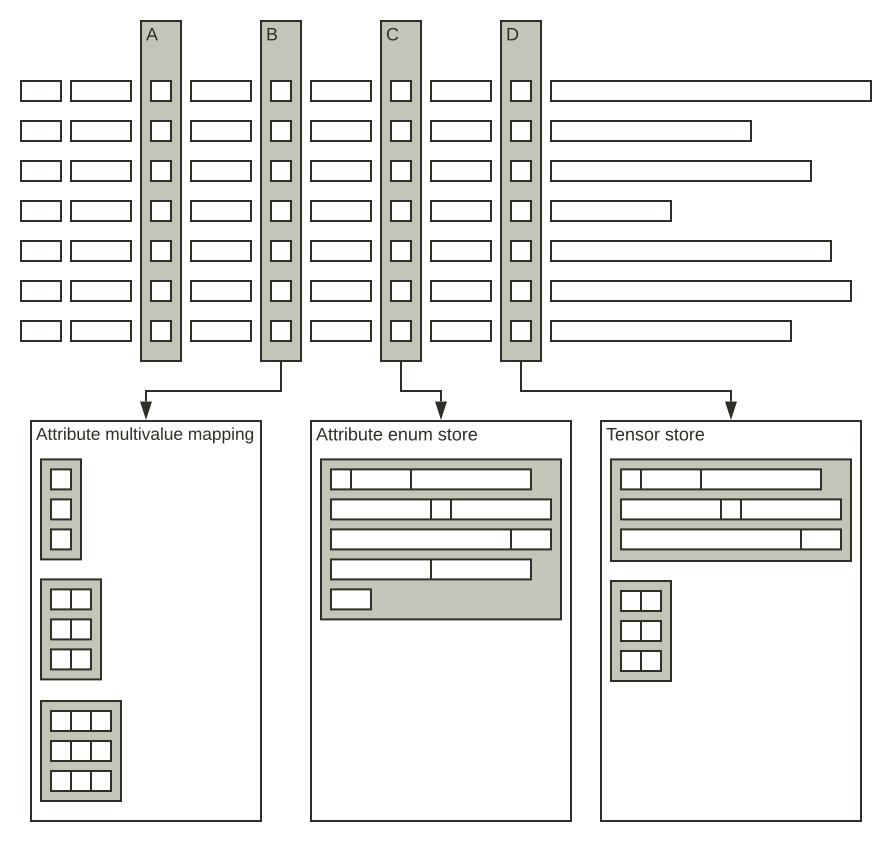
Attribute Multivalue Mapping stores arrays of values for array and weighed set types.
Attribute Enum Store stores unique strings for all string attributes and unique values for
attributes with fast-search.
Attribute Tensor Store stores tensor values for all tensor attributes.
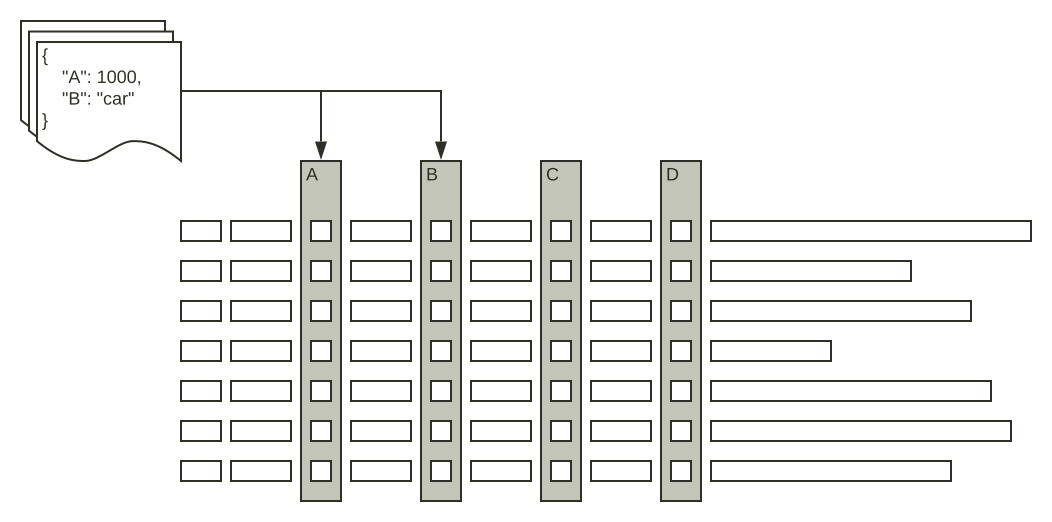
In the following illustration, a row represents a document, while a named column represents an attribute.
Attributes can be:
Type
Size
Description
Single-valued
Fixed
Like the "A" attribute, example int.
The element size is the size of the type, like 4 bytes for an integer.
A memory buffer (indexed by Local ID) holds all values directly.
Multi-valued
Fixed
Like the "B" attribute, example array<int>.
A memory buffer (indexed by Local ID) is holding references (32 bit) to where in the Multivalue Mapping the arrays are stored.
The Multivalue Mapping consists of multiple memory buffers, where arrays of the same size are co-located in the same buffer.
Multi-valued
Variable
Like the "B" attribute, example array<string>.
A memory buffer (indexed by Local ID) is holding references (32 bit) to where in the Multivalue Mapping the arrays are stored.
The unique strings are stored in the Enum Store, and the arrays in the Multivalue Mapping
stores the references (32 bit) to the strings in the Enum Store.
The Enum Store consists of multiple memory buffers.
Single-valued
Variable
Like the "C" attribute, example string.
A memory buffer (indexed by Local ID) is holding references (32 bit) to where in the Enum Store the strings are stored.
Tensor
Fixed / Variable
Like the "D" attribute, example tensor<float>(x{},y[64]).
A memory buffer (indexed by Local ID) is holding references (32 bit) to where in the Tensor Store the tensor values are stored.
The memory layout in the Tensor Store depends on the tensor type.
The "A", "B", "C" and "D" attribute memory buffers have attribute values or references in Local ID (LID) order -
see document meta store.
When updating an attribute, the full value is written.
This also applies to multivalue fields -
example adding an item to an array:
Space for the new array is reserved in a memory buffer
The current value is copied
The new element is written
This means that larger fields will copy more data at updates.
It also implies that updates to weighted sets
are faster when using numeric keys (less memory and easier comparisons).
Data stored in the Multivalue Mapping, Enum Store and Tensor Store
is referenced using 32 bit references.
This address space can go full, and then feeding is blocked - learn more.
For array or weighted set attributes,
the max limit on the number of documents that can have the same number of values is approx 2 billion per node.
For string attributes or attributes with
fast-search,
the max limit on the number of unique values is approx 2 billion per node.
Index structures
Without fast-search, attribute access is a memory lookup,
being one value or all values, depending on query execution.
An attribute is a linear array-like data structure -
matching documents potentially means scanning all attribute values.
Setting fast-search
creates an index structure for quicker lookup and search.
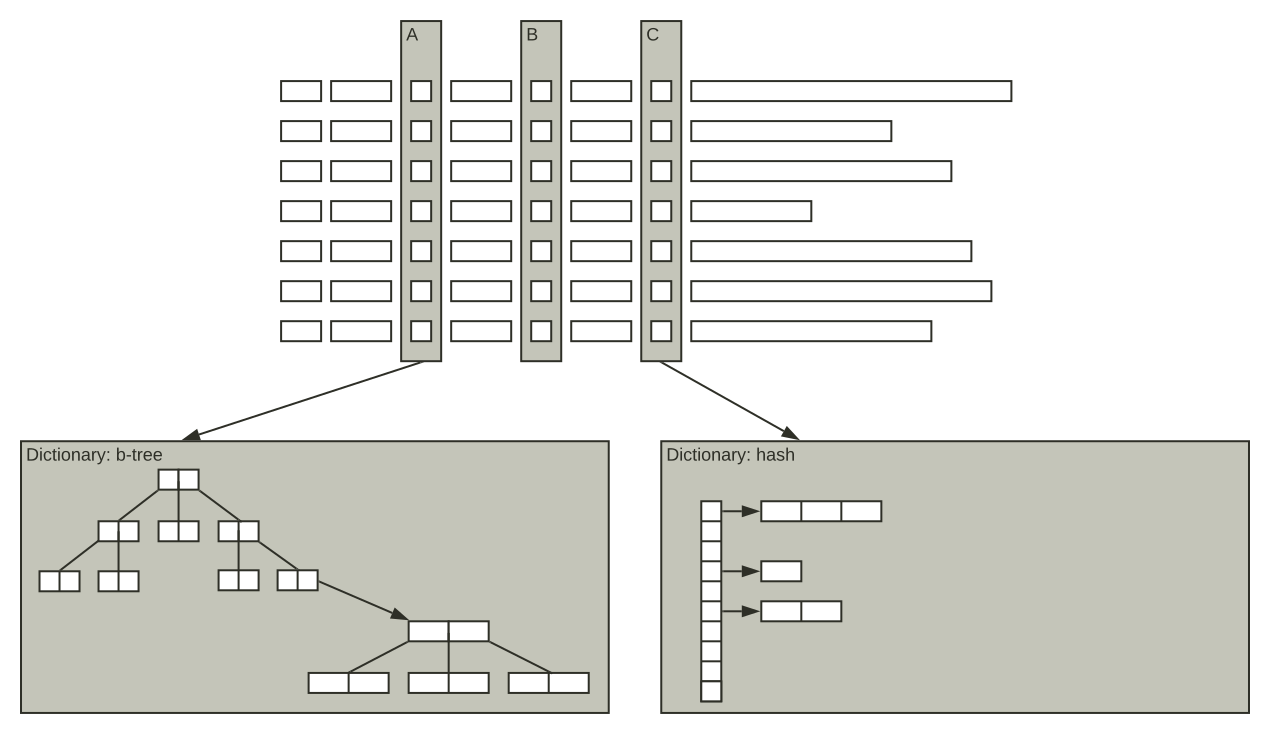
This consists of a dictionary pointing to posting lists.
This uses more memory, and also more CPU when updating documents.
It increases steady state memory usage for all attribute types
and also add initialization overhead for numeric types.
The default dictionary is a b-tree of attribute values,
pointing to an occurrence b-tree (posting list) of local doc IDs for each value, exemplified in the A-attribute below.
Using dictionary: hash on the attribute generates a hash table of attributes values pointing to the posting lists,
as in the C-attribute (short posting lists are represented as arrays instead of b-trees):
Notes:
If a value occurs in many documents, the occurrence b-tree grows large.
For such values, a boolean-occurrence list (i.e. bitvector) is generated in addition to the b-tree.
Setting fast-search is not observable in the files on disk, other than size.
fast-search causes a memory increase even for empty fields,
due to the extra index structures created.
E.g. single value fields will have the "undefined value" when empty,
and there is a posting list for this value.
The value b-tree enables fast range-searches in numerical attributes.
This is also available for hash-based dictionaries, but slower as a full scan is needed.
Attribute structures are regularly optimized, and this causes temporary resource usage -
read more in maintenance jobs.
The memory footprint of an attribute depends on a few factors,
data type being the most important:
Numeric (int, long, byte, and double) and Boolean (bit) types -
fixed length and fix cost per document
String type - the footprint depends on the length of the
strings and how many unique strings that needs to be
stored.
Collection types like array and weighted sets increases the memory
usage some, but the main factor is the average number of values per document.
String attributes are typically the largest attributes,
and requires most memory during initialization - use boolean/numeric types where possible.
Example, refer to formulas below:
Assume average 10 values per document, average string length 15, 100k unique strings and 20M documents.
Steady state memory usage is approx 1 GB (20M*4*(6/5) + 20M*10*4*(6/5) + 100k*(15+1+4+4)*(6/5)).
During initialization (loading attribute from disk) an additional 2.4 GB is allocated (20M*10*(4+4+4),
for each value:
local document ID
enum value
weight
Increasing the average number of values per document to 20 (double) will also double the memory
footprint during initialization (4.8 GB).
When doing the capacity planning, keep in mind the maximum footprint, which occurs during initialization.
For the steady state footprint, the number of unique values is important for string attributes.
Check the Example attribute sizing spreadsheet,
with various data types and collection types.
It also contains estimates for how many documents a 48 GB RAM node can hold, taking initialization into account.
Multivalue attributes use an
adaptive approach in how data is stored in memory,
and up to 2 billion documents per node is supported.
Pro-tip: The proton /state/v1/ interface can be explored for attribute memory usage.
This is an undocumented debug-interface, subject to change at any moment - example:
http://localhost:19110/state/v1/custom/component/documentdb/music/subdb/ready/attribute/artist
Attribute file usage
Attribute data is stored in two locations on disk:
The attribute store in memory, which is regularly flushed to disk.
At startup, the flushed files are used to quickly populate the memory structures,
resulting in a much quicker startup compared to generating the attribute store from the source in the document store.
The attribute store will temporarily double its disk usage when generating a new flush file,
see attribute flush.
The document store on disk.
Documents here are used to (re)generate index structures,
as well as being the source for replica generation across nodes.
Note that the attribute data is stored in the document store regardless of
the summary configuration.
The different field types use various data types for storage, see below,
a conservative rule of thumb for steady-state disk usage is hence twice the data size.
Sizing
Attribute sizing is not an exact science but rather an approximation.
The reason is that they vary in size.
Both the number of documents, number of values, and uniqueness of the values are variable.
The components of the attributes that occupy memory are:
Abbreviation
Concept
Comment
D
Number of documents
Number of documents on the node, or rather the maximum number of local document IDs allocated
sizeof(T) for numerics, 1 byte for strings, 1 bit for boolean
WW
Weight width
Width of the weight in a weighted set, 4 bytes. 0 bytes for arrays.
EIW
Enum index width
Width of the index into the enum store, 4 bytes. Used by all strings and other attributes if
fast-search is set
VW
Variable data width
strlen(s) for strings, 0 bytes for the rest
PW
Posting entry width
Width of a posting list entry, 4 bytes for singlevalue, 8 bytes for array and weighted sets.
Only applies if fast-search is set.
PIW
Posting index width
Width of the index into the store of posting lists; 4 bytes
MIW
Multivalue index width
Width of the index into the multivalue mapping; 4 bytes
ROF
Resize overhead factor
Default is 6/5. This is the average overhead in any dynamic vector due to
resizing strategy. Resize strategy is 50% indicating that
structure is 5/6 full on average.
Components
Component
Formula
Approx Factor
Applies to
Document vector
D * ((FW or EIW) or MIW)
ROF
FW for singlevalue numeric attributes and MIW for
multivalue attributes. EIW for singlevalue string or if the
attribute is singlevalue fast-search
Multivalue mapping
D * V * ((FW or EIW) + WW)
ROF
Applicable only for array or weighted sets. EIW if string or fast-search
Enum store
U * ((FW + VW) + 4 + ((EIW + PIW) or EIW))
ROF
Applicable for strings or if fast-search is set.
(EIW + PIW) if fast-search is set, EIW otherwise.
Posting list
D * V * PW
ROF
Applicable if fast-search is set
Variants
Type
Components
Formula
Numeric singlevalue plain
Document vector
D * FW * ROF
Numeric multivalue value plain
Document vector, Multivalue mapping
D * MIW * ROF + D * V * (FW+WW) * ROF
Numeric singlevalue fast-search
Document vector, Enum store, Posting List
D * EIW * ROF + U * (FW+4+EIW+PIW) * ROF + D * PW * ROF
Numeric multivalue value fast-search
Document vector, Multivalue mapping, Enum store, Posting List
D * MIW * ROF + D * V * (EIW+WW) * ROF + U * (FW+4+EIW+PIW) * ROF + D * V * PW * ROF
Singlevalue string plain
Document vector, Enum store
D * EIW * ROF + U * (FW+VW+4+EIW) * ROF
Singlevalue string fast-search
Document vector, Enum store, Posting List
D * EIW * ROF + U * (FW+VW+4+EIW+PIW) * ROF + D * PW * ROF
Multivalue string plain
Document vector, Multivalue mapping, Enum store
D * MIW * ROF + D * V * (EIW+WW) * ROF + U * (FW+VW+4+EIW) * ROF
Multivalue string fast-search
Document vector, Multivalue mapping, Enum store, Posting list
D * MIW * ROF + D * V * (EIW+WW) * ROF + U * (FW+VW+4+EIW+PIW) * ROF + D * V * PW * ROF
Boolean singlevalue
Document vector
D * FW * ROF
Paged attributes
Regular attribute fields are guaranteed to be in-memory, while the
paged
attribute setting allows paging the attribute data out of memory to disk.
The paged setting is not supported for the following types:
For attribute fields using
fast-search,
the memory needed for dictionary and index structures are never paged out to disk.
Using the paged setting for attributes
is an alternative when there are memory resource constraints
and the attribute data is only accessed by a limited number of hits per query during ranking.
E.g. a dense tensor attribute which is only used during a re-ranking phase,
where the number of attribute accesses are limited by the re-ranking phase count.
For example using a second phase total-rerank-count
of 100 will limit the maximum number of page-ins/disk access per query to 100.
Running at 100 QPS would need up to 10K disk accesses per second.
This is the worst case if none of the accessed attribute data were paged into memory already.
This depends on access locality and memory pressure (size of the attribute data versus available memory).
In this example, we have a dense tensor with
1024 int8 values.
The tensor attribute is only accessed during re-ranking (second-phase ranking expression):
For some use cases where serving latency SLA is not strict and query throughput is low,
the paged attribute setting might be a tuning alternative,
as it allows storing more data per node.
Paged attributes disadvantages
The disadvantages of using paged attributes are many:
Unpredictable query latency as attribute access might touch disk. Limited queries per second throughput
per node (depends on the locality of document re-ranking requests).
Paged attributes are implemented by file-backed memory mappings. The performance depends on
the Linux virtual memory management ability to page
data in and out. Using many threads per search/high query throughput might cause high system (kernel) CPU and
system unresponsiveness.
The content node's total memory utilization will be close to 100% when using paged attributes.
It's up to the Linux kernel to determine what part of the attribute data is paged into memory based on access patterns.
A good understanding of how the Linux virtual memory management system works is recommended before enabling paged attributes.
The
memory usage metrics
from content nodes are not reflecting the reality when using paged attributes.
They can indicate a usage that is much higher than the available memory on the node.
This is because attribute memory usage is reported as the amount of data contained in the attribute,
and whether this data is paged out to disk is controlled by the Linux kernel.
Using paged attributes doubles the disk usage of attribute data.
For example if the original attribute size is 92 GB (100M documents of the above 1024 int8 per document schema),
using the paged setting will double the attribute disk usage to close to 200 GB.
Changing the paged setting (e.g. removing the option) on a running system might cause hard out-of-memory situations as
without paged, the content nodes will attempt loading the attribute into memory without the option for page outs.
Using a paged attribute in first-phase ranking
can result in extremely high query latency if a large amount of the corpus is retrieved by the query.
The number of disk accesses will, in the worst case, be equal to the number of hits the query produces.
A similar problem can occur if running a query that searches a paged attribute.
Using paged in combination with HNSW indexing is strongly discouraged.
HNSW indexing
also searches and reads tensors during indexing, causing random access during feeding. Once the system memory usage reaches 100%,
the Linux kernel will start paging pages in and out of memory. This can cause a high system (kernel) CPU and slows down HNSW indexing
throughput significantly.
Mutable attributes
Mutable attributes is document metadata
for matching and ranking performance per document.
The attribute values are mutated as part of query execution, as defined in rank profiles -
see rank phase statistics for details.
Document meta store
The document meta store is an in-memory data structure for all documents on a node.
It is an implicit attribute, and is
compacted and
flushed.
Memory usage for applications with small documents / no other attributes can be dominated by this attribute.
The document meta store scales linearly with number of documents -
using approximately 30 bytes per document.
The metric content.proton.documentdb.ready.attribute.memory_usage.allocated_bytes for
"field": "[documentmetastore]" is the size of the document meta store in memory - use the
metric API to find the size -
in this example, the node has 9M ready documents with 52 bytes in memory per document: