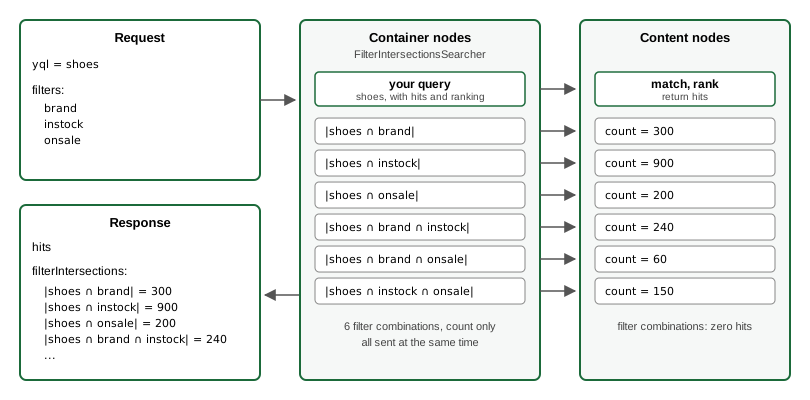
Filter intersections tell you how many results your query would have if you narrowed it down with one or more additional filters, without actually narrowing it down. You send a normal query, for example "all shoes", together with a list of named filters written in YQL, for example "brand is Nike", "in stock" and "on sale". Vespa returns the query's hits as usual, plus a count for every filter and every combination of filters, where you would otherwise need one query per combination.
Every count includes your query: "in stock" means "shoes that are in stock". For the shoe example, the counts could look like this:
| Filters added to the "all shoes" query | Matching shoes |
|---|---|
| Nike | 300 |
| In stock | 900 |
| On sale | 200 |
| Nike and in stock | 240 |
| Nike and on sale | 60 |
| In stock and on sale | 150 |
Each combination runs as a copy of your query with the filters added and zero
hits requested. All combinations run in parallel with your query, and their
counts are computed like the query's own totalCount, so they are directly comparable.
Your original query and its hits are unchanged.
Setting it up
Step 1: Add the searcher to a search chain
Open services.xml in your
application package and add a search chain with the searcher to the <search>
element inside your <container>. If you have no <search> element yet, add one
directly inside <container>:
<services version="1.0">

    <container id="your-id-here" version="1.0">
        <document-api/>

        <search>
            <chain id="default" inherits="vespa">
                <searcher id="ai.vespa.search.counting.FilterIntersectionsSearcher"/>
            </chain>
        </search>
    </container>

    <content id="your-id-here" version="1.0">
        <!-- Your content cluster, unchanged -->
    </content>

</services>
<chain id="default" inherits="vespa"> declares the search chain that handles
requests that do not ask for a specific chain. inherits="vespa" pulls in all
the built-in searchers, so the rest of query processing keeps working as before.
If you already have a chain with id="default", add the <searcher> line inside
that chain instead of adding a second one.
filterIntersections.filters
query parameter, so adding it to the default chain does not
change the behavior or cost of your other queries.
If you prefer to keep it out of the default chain, put it in a chain of its own:
<search>
    <chain id="with-counts" inherits="vespa">
        <searcher id="ai.vespa.search.counting.FilterIntersectionsSearcher"/>
    </chain>
</search>
Queries then select this chain by adding the
searchChain query parameter,
for example vespa query 'yql=...' searchChain=with-counts.
Step 2: Deploy
Deploy the application package to Vespa Cloud as usual, see Deploy an application:
$ vespa deploy --wait 600
The same command deploys to a self-managed Vespa when the CLI target points to it.
Querying with filter intersections
Add the filterIntersections.filters query parameter to your query, a JSON array of named YQL filters as seen below. Using the Vespa CLI:
$ vespa query \
    'yql=select * from sources product where category contains "shoes"' \
    'hits=10' \
    'filterIntersections.filters=[{"name":"brand","where":"brand contains \"nike\""},{"name":"instock","where":"stock > 0"},{"name":"onsale","where":"discount > 0"}]'
Set hits=0 if you only want the counts. By default you get every filter on its
own and every pair. Set filterIntersections.dimensions to 3 to also get every
triple, and so on, see the reference
for all parameters.
In the response, the counts are in root.fields.filterIntersections.buckets,
next to the usual totalCount:
{
  "root": {
    "fields": {
      "totalCount": 1200,
      "filterIntersections": {
        "buckets": [
          { "key": "brand",           "names": ["brand"],            "totalCount": 300 },
          { "key": "instock",         "names": ["instock"],          "totalCount": 900 },
          { "key": "onsale",          "names": ["onsale"],           "totalCount": 200 },
          { "key": "brand&instock",   "names": ["brand", "instock"], "totalCount": 240 },
          { "key": "brand&onsale",    "names": ["brand", "onsale"],  "totalCount": 60  },
          { "key": "instock&onsale",  "names": ["instock", "onsale"],"totalCount": 150 }
        ]
      }
    },
    "children": [ "..." ]
  }
}
Each bucket is one combination: names lists its filters, key joins them with & in
case-insensitive sorted order, and totalCount is the number of documents matching
the query and all of those filters.
Caveats
Counts can be lower bounds
Most operators look at every matching document, so counts are exact. The operators
below stop early once they have found enough good matches, so documents they skip are
not counted. If your query or a filter uses one of them, the reported count can be
lower than the true number of matches. The same applies to totalCount in ordinary
queries.
| Operator | Why the count is a lower bound |
|---|---|
| weakAnd, wand |
Keep only the targetHits
best-scoring documents per content node and skip documents that cannot score higher.
Exact only when fewer documents match than targetHits.
|
| nearestNeighbor |
Always returns targetHits documents per content node, however far away,
so on its own it is not a filter. Add
distanceThreshold and a
targetHits high enough to cover every document within that distance.
With HNSW, the count is still capped at targetHits per node. With
approximate:false, the count can exceed targetHits, but is
exact only when targetHits covers every document within the distance.
|
| range with hitLimit | Looks at only the first hitLimit values. A range without it is exact. |
weakAnd by default, so counts
are then lower bounds. This applies to
userInput() and
text(), both in the base query and in filters, and to userQuery(), which reads the
model.queryString request parameter. For exact
counts, set all or any in the
grammar annotation of userInput()
and text(), for example {grammar: "all"}userInput(@q), and in the
model.type request parameter for
userQuery().
Differences from your query's totalCount
Combinations use your query's rank profile, so its query inputs apply to combinations too.
A first-phase rank-score-drop-limit
reduces your query's totalCount but not a combination's count. A combination asks for
zero hits, so there is nothing to order and Vespa skips ranking, and without a score
there is nothing for the limit to drop. The same holds for your query when it also
asks for zero hits, so with hits=0 neither count is reduced. This does not apply if
the query contains nearestNeighbor, weakAnd or wand, which need scores to match
and are always ranked.
buckets, and an error naming it is added to root.errors, so
typically no counts are returned. Use a rank profile without match-phase for queries
with filter intersections.
Computational cost
- Each combination is a full count query on the content nodes, so content node load grows linearly with the number of combinations. Ten combinations is ten times the matching work.
- The number of combinations grows fast with more filters and dimensions: 20 filters
at
dimensions=3give 1350.filterIntersections.maxCells, default 1000, caps the number of combinations and rejects larger requests. If clients you do not control can send requests, setmaxCellsin a query profile with overridable="false", so requests cannot raise it. - With zero hits, Vespa skips scoring unless the query contains
nearestNeighbor,weakAndorwand. Then every combination pays for scoring, second phase included, so a cheap rank profile keeps combinations cheap. - Filters on attributes with fast-search are much faster than filters that scan attribute values.
Timeouts and missing counts
Combinations share the request's timeout and the container's thread pool. With many
combinations or a busy container, some may not finish in time. A count is never returned
wrong silently: a combination that fails or has degraded coverage is omitted from buckets,
and an error naming the combination is added to root.errors. Invalid filters or parameters
reject the whole request. See the errors reference.
Your query runs in the same thread pool as its combinations, so with a short timeout
and many combinations, your query itself can time out. The whole request then fails
with a timeout error, and no counts are returned.
Counts only
Filter intersections give you counts, not other aggregates. For sums, averages, minimum and maximum values, or counts per distinct value of a field, such as "products per brand", use grouping. The two work well together: grouping for aggregates over field values, filter intersections for counting how arbitrary YQL filters combine.
Streaming mode
In streaming mode, content nodes run every
query with zero hits and no grouping with the built-in unranked profile, so combinations
do not use your rank profile. A nearestNeighbor filter therefore fails in streaming
mode, because unranked does not declare the query tensor it needs.