-
Applications and components
- Developer guide
- IDE support
- Deployment
- .vespaignore files
- Containers
- Components
- Searchers
- Document processors
- Request handlers
- Result renderers
- Dependency injection
- Configuring components
- Chaining
- Inspecting structured data in a Searcher
- Developing web services
- Unit testing
- System testing
- The config system
- Request-response processing
- Bundles
- Using ZooKeeper
- Http servers and filters
- Using pluggable frameworks
- Java config API
-
Querying
- The query api
- The YQL query language
- Grouping and aggregation
- Query profiles
- An intro to vector search
- Nearest neighbor search
- Approximate nearest neighbor search
- Nearest neighbor search guide
- Text matching
- Searching multivalue fields
- Geo search
- Document summaries
- Result diversity
- Federation
- Page templates
- Filter intersections
-
Ranking and inference
- Ranking introduction
- Ranking expressions and features
- Multivalue query operators
- Tensor user guide
- Tensor examples
- Phased ranking
- Using TensorFlow models
- Using ONNX models
- Using XGBoost models
- Using LightGBM models
- Wand: Accelerated OR search
- The BM25 rank feature
- The nativeRank rank feature
- Cross-encoder transformer ranking
- Searcher re-ranking
- Significance model
- Stateless model evaluation
-
Linguistics and text processing
-
Content and elasticity
-
Performance
- Performance overview
- Practical performance guide
- Serving sizing guide
- Feed sizing guide
- Node resources
-
Instance types
- Topology and resizing
- Streaming search
- Benchmarking
- Benchmarking using Vespa Cloud
- Memory visualizer
- Profiling
- Container tuning
- Rate-limiting queries
- Graceful degradation
- Caches
- HTTP performance testing
- HTTP/2
- Feature tuning
- Valgrind
-
Operations
- Quota
- Environments
- Zones
- Availability Zones
- Production deployment
- Deployment variants
- Automated deployments
- Autoscaling
-
Enclave: Bring your own cloud
- Reindexing
- Reindexing on Vespa Cloud
- Data management and backup
- Cloning applications and data
- Monitoring
- Metrics
- Telemetry export
- Notifications
- Support
- Login Help
- Single Sign-On (SSO) Setup
- Deployment patterns
- Private endpoints
- Endpoint routing
- Access logging
-
Artifact archive
- Deleting applications
-
Self-managed
- Admin procedures
- Multinode Systems
- Files, Processes, Ports, Environment
- Node Setup
- Build and install
- Monitoring
- Content node recovery
- Configuration Servers
- Live Vespa upgrade procedure
- Config Sentinel
- Config Proxy
- Docker Containers
- Docker Containers GPU setup
- CPU Support
- Service Location Broker
- Change from attribute to index procedure
- Container
- Sizing examples
- Vespa Support CLI
-
Kubernetes
- Introduction
-
Reference
-
Modules
-
Reference
-
Applications and components
-
Schemas and documents
-
Reading and writing
-
Operations
- Health checks
- Log files
- Tools
-
Self-managed
-
Security
-
Release notes
Vespa Cloud runs on compute instances, like EC2 in AWS. The hosts are booted with an image, which is updated regularly. The hosts run Vespa in an OCI container image - upgrading Vespa means restarting the container with a new image. This article is about the image running on the hosts, and managing these.
Host image automation
Vespa.ai releases new host images on a weekly basis - approximately:
- The image is normally released on Tuesdays.
- Use the Enclave Console view to see the Target image name, like 9.0.0.20260724.
- In the same view, find the host list of your applications, and their update status:
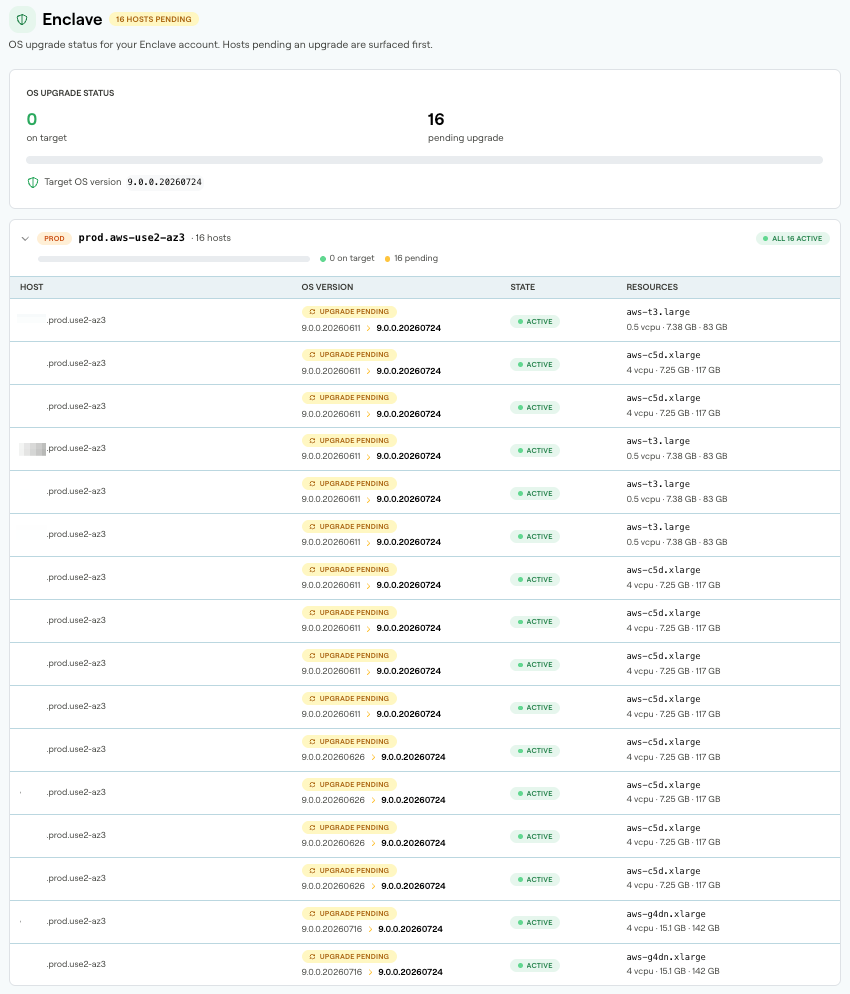
Notes
- New images are released by automation, and not at a fixed schedule. For example, high-priority images can be released at any time, and a weekly release can be stopped at any time in regression testing.
- The OS update process runs per availability zone (AZ) in a region, until 90% complete.
This means, normally one AZ is done before moving to the next, but there is overlap.
Your serving capacity is therefore potentially reduced in a region with concurrent updates across AZs.
As a rule of thumb, capacity should be built for AZ fail-out plus one node down in remaining AZs.
- The staggered rollout means that the Target image can vary per AZ - this is visible in the view (above).
- To override the automation (e.g. to pause the update process), contact Vespa Support, or modify block windows (below).
- Hosts converge on the latest image - the Target OS version. Large applications might run on multiple images during the process.
- New hosts (replacements for failed hosts, or capacity increases) are always allocated using the Target image.
Updating host image
The automated process of updating the image is:
- Stop the Vespa container image (orchestrated).
- Stop the host, and start it again with an updated image. When the host is stopped, a backup is made, too.
This means, one or more nodes are stopped, orchestrated for availability, and upgraded - repeated for all hosts. This takes minutes per host, depending on index sizes.
Controlling the image updates
The orchestrated restarts cause lower serving capacity while running. Use the maintenance attribute in block windows to run the process at times that aligns with your operational processes, e.g. at low hours.
This example blocks maintenance during working hours, while still allowing application deployments and platform upgrades at any time:
<block-change maintenance="true"
              revision="false"
              version="false"
              hours="8-15"
              time-zone="America/Los_Angeles"/>
Deployment pipeline
The OS upgrades are not integrated with the deployment pipeline. However, as the node restarts are orchestrated, deployments can be slowed down due to this. This because nodes are required to report the config generation for successful deployment - and restarting a node slows this process down.
How to run new target images in QA instances first
Application owners might want to deploy new target OS version in a QA instance before the production serving clusters. As this process is not pipelined (above), contact Vespa Support for options.