-
Applications and components
- Developer guide
- IDE support
- Deployment
- .vespaignore files
- Containers
- Components
- Searchers
- Document processors
- Request handlers
- Result renderers
- Dependency injection
- Configuring components
- Chaining
- Inspecting structured data in a Searcher
- Developing web services
- Unit testing
- System testing
- The config system
- Request-response processing
- Bundles
- Using ZooKeeper
- Http servers and filters
- Using pluggable frameworks
- Java config API
-
Querying
- The query api
- The YQL query language
- Grouping and aggregation
- Query profiles
- An intro to vector search
- Nearest neighbor search
- Approximate nearest neighbor search
- Nearest neighbor search guide
- Text matching
- Searching multivalue fields
- Geo search
- Document summaries
- Result diversity
- Federation
- Page templates
- Filter intersections
-
Ranking and inference
- Ranking introduction
- Ranking expressions and features
- Multivalue query operators
- Tensor user guide
- Tensor examples
- Phased ranking
- Using TensorFlow models
- Using ONNX models
- Using XGBoost models
- Using LightGBM models
- Wand: Accelerated OR search
- The BM25 rank feature
- The nativeRank rank feature
- Cross-encoder transformer ranking
- Searcher re-ranking
- Significance model
- Stateless model evaluation
-
Linguistics and text processing
-
Content and elasticity
-
Performance
- Performance overview
- Practical performance guide
- Serving sizing guide
- Feed sizing guide
- Node resources
-
Instance types
- Topology and resizing
- Streaming search
- Benchmarking
- Benchmarking using Vespa Cloud
- Memory visualizer
- Profiling
- Container tuning
- Rate-limiting queries
- Graceful degradation
- Caches
- HTTP performance testing
- HTTP/2
- Feature tuning
- Valgrind
-
Operations
- Quota
- Environments
- Zones
- Availability Zones
- Production deployment
- Deployment variants
- Automated deployments
- Autoscaling
-
Enclave: Bring your own cloud
- Reindexing
- Reindexing on Vespa Cloud
- Data management and backup
- Cloning applications and data
- Monitoring
- Metrics
- Telemetry export
- Notifications
- Support
- Login Help
- Single Sign-On (SSO) Setup
- Deployment patterns
- Private endpoints
- Endpoint routing
- Access logging
-
Artifact archive
- Deleting applications
-
Self-managed
- Admin procedures
- Multinode Systems
- Files, Processes, Ports, Environment
- Node Setup
- Build and install
- Monitoring
- Content node recovery
- Configuration Servers
- Live Vespa upgrade procedure
- Config Sentinel
- Config Proxy
- Docker Containers
- Docker Containers GPU setup
- CPU Support
- Service Location Broker
- Change from attribute to index procedure
- Container
- Sizing examples
- Vespa Support CLI
-
Kubernetes
- Introduction
-
Reference
-
Modules
-
Reference
-
Applications and components
-
Schemas and documents
-
Reading and writing
-
Operations
- Health checks
- Log files
- Tools
-
Self-managed
-
Security
-
Release notes
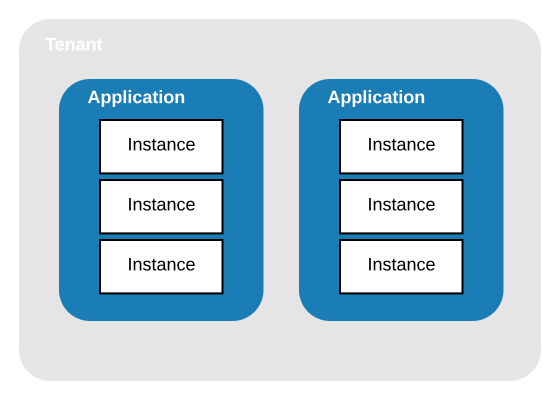
When registering for Vespa Cloud, a tenant is created. Tenant is the billable unit, and most often represents an organization or a project. A tenant has one or more applications with one or more instances:
Instances are used for different use cases, and are deployed to a set of zones - example:
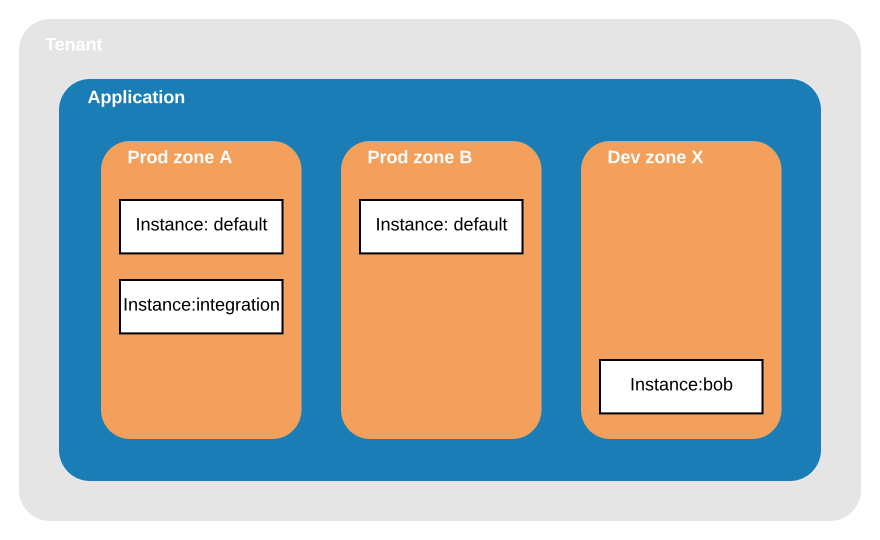
The Application has a "default" instance serving queries from two production zones. It has an "integration" instance with another dataset, used for other applications to interface a production-like, stable interface. Finally, a developer has deployed the "bob" instance to a dev zone to further develop plugin code.
Deployments to production zones are specified in deployment.xml. Deployments to the manual dev zones are normally done directly from a developer computer for rapid code and config development. Read more in Automated deployments.
The service configuration is specified in services.xml and is composed of individually sized clusters. A cluster is deployed to a set of nodes with resources specified.
One or more users may be a member of the tenant. A user is given roles in the tenant based on their access level. Administrator for tenant level managment like adding new members and updating billing data, Developer for managing applications, and one for read-only access.
Lifecycle
The tenant name cannot be changed - create a new tenant, or contact Vespa Support.
Tenants in trial are auto-expired once trial is completed. Move to a paid plan to keep applications and data.
It is not possible to auto-migrate applications and data between tenants. To move an application to a new tenant, re-deploy the application with the new tenant name, see cloning applications and data.